

Blog/Comparison
Opal Screen Time App Review: Is Opal Free, and Is It Worth It?
What Opal's free plan includes, what Pro costs, how strict its blocks really get, and when another app is the better choice.


In this article
Opal is one of the best-known screen time apps on the iPhone, and its promise is easy to like: you decide in a calm moment which apps to block and when, and Opal holds the line at 11 p.m., when you won't. Whether you need to pay for it comes down to one setting, and to how much of your day you want it to cover.
Disclosure: Unrotten, one of the alternatives below, is made by the team behind this blog. We checked Opal on October 29, 2026, against its US App Store listing, its official website and its help centre, and every other app against its own listing and site the same day. We didn't lab-test anything: every price, rating and feature here comes from those pages.
Opal at a glance
- What it is: a screen time app for iPhone, Mac and Android by Opal OS Corporation, on the App Store since December 2020.
- Price: a free plan; Opal Pro is $99.99 a year, $19.99 a month or $399 once.
- Needs: iOS 18 or later on an iPhone.
- Rating: 4.7 stars from about 90,500 US App Store ratings.
- Best for: people who want strict, scheduled blocking and like watching a score improve.
- Watch out for: the strictest setting is part of Pro, and Pro's yearly price is the highest among the blockers we've compared.
How Opal works
On an iPhone, Opal blocks apps through Apple's Screen Time API, as most blockers do, and its listing says it "works entirely on your phone and personal browsing data never leaves your device." Everything you set up is a rule.
Rules: schedules, time limits and open limits
A rule picks the apps, websites or whole categories to block, and says when:
- On a schedule, such as your work hours or the hour before bed, repeated through the week.
- After a time limit, once you've spent a set number of minutes in those apps that day.
- After an open limit, once you've opened them a set number of times.
A session can also run Always On, blocking until you decide to stop, and Pro adds Allow Only, which blocks everything except the apps you pick. Sessions can start on their own from an iPhone Focus mode or a Shortcuts automation, triggered by the time, your location or opening an app.
The block screen, and the way back in
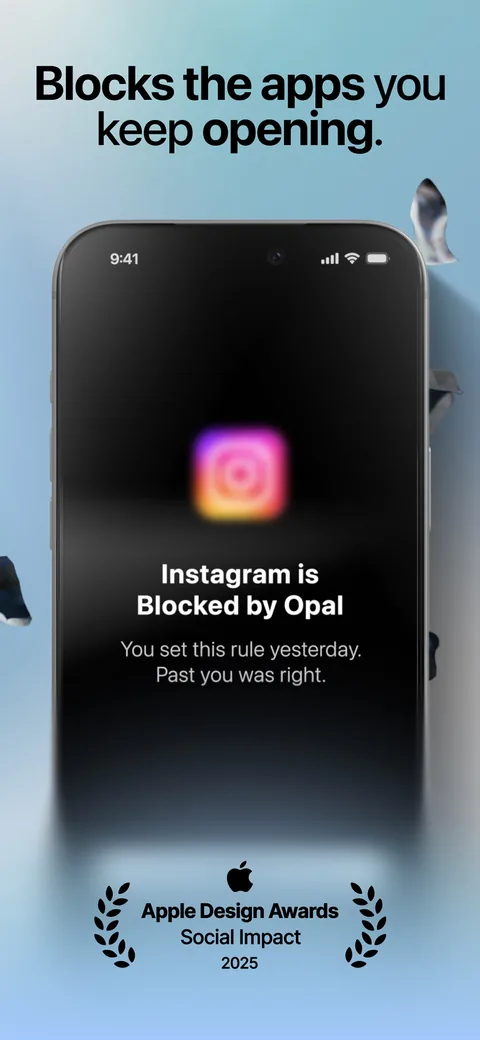
Open a blocked app and Opal's block screen appears instead, with a quote or a pun. If you really need the app, a break lets you choose it, write down your intention and set a timer. A waiting room can make you wait first, and on its Hard setting the wait grows each time.
How strict it gets
Each rule has a difficulty, and this is where Opal earns its reputation. Easier settings let you snooze or end a session. The strictest, called "No way, I'm hardcore" in Opal's help centre, won't let you take a break or end the session early; the App Store listing says Deep Focus "won't let you cancel or bypass at all." The help centre adds two details: the hardcore difficulty is only for Opal Pro, and a hardcore session can still be ended early once a week.
The hard part of a blocker isn't the blocking. It's deciding, in advance, how hard it should be to get back in.
Two settings close the obvious loopholes. App Uninstall Protection stops you from deleting Opal, or changing your phone's date and time, during a blocking session. And with a Screen Time passcode set, Opal can't be uninstalled without it, even after a session ends.
Focus timers, the Opal Score and gems
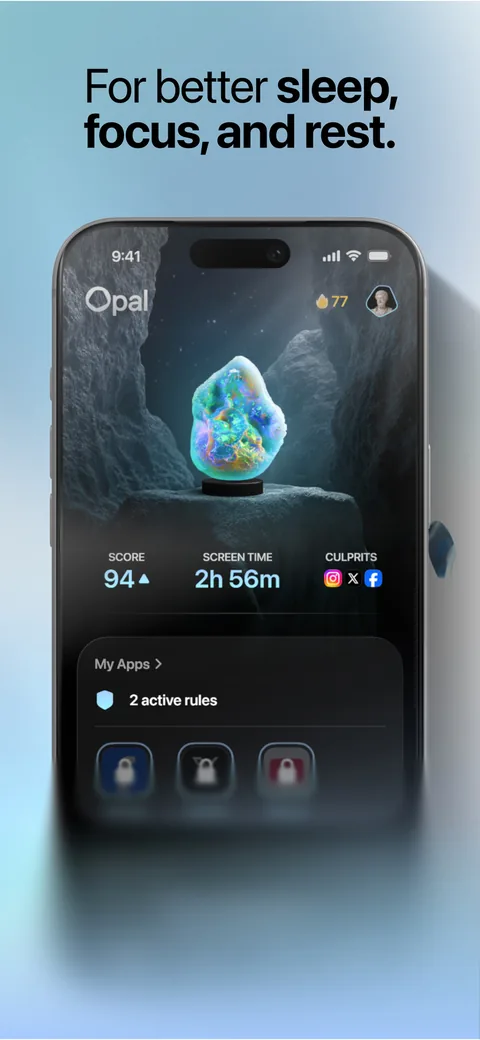
A focus timer blocks your chosen apps for a length you set, with soundscapes to work to. The Opal Score, in the company's words, "combines signals from your sleep, focus, and rest into a single measure"; the free plan shows today's score and Pro keeps its history. Gems mark milestones, from your first day to 1,000 hours of focus, a leaderboard lets you challenge friends, and a focus report compares your numbers with other people's.
Is Opal free? What it costs
Yes, Opal has a free plan with no end date. On its pricing page on October 29, 2026:
- Free: one rule (a schedule, a time limit or an open limit), app blocking, basic timers and soundscapes, and the Opal Score for today only.
- Opal Pro: unlimited rules, Hard Mode ("No way out. You can't turn Opal off."), Allow Only, advanced timers and soundscapes, and the score's history. It costs $99.99 a year (about $8.29 a month) with a free week, $19.99 a month with three free days, or $399 once for life.
- Students can get up to 50% off Pro, and teams can ask for a quote.
The US App Store lists more plans than the pricing page: weekly plans at $4.99 and $9.99, an Opal Student Weekly plan at $9.99 and an Opal Pro Subscription at $49.99, without saying who is offered which. Read the price on the paywall before a trial starts. Opal's 30-day money-back guarantee covers purchases made on its website; purchases in the iPhone app go through Apple.
Is the free plan enough? One rule can carry a bedtime schedule or your work hours, which is often where the worst scrolling happens. What it can't carry is the hardcore difficulty. If you keep talking yourself out of your own blocks, that strictness is what Pro is for.
Does strict blocking work?
Nobody has published a trial of Opal itself. Its headline figure, 1 hour 23 minutes saved a day, comes from its members' screen time before and after joining, more than 300,000 people according to its website. That isn't a controlled trial: the people who stay with an app tend to be the ones it suits. But the ideas Opal is built on have been tested.
People want limits they can't easily undo. In a 12-week experiment with about 2,000 American adults on Android phones, people were offered app limits that took effect the next day and, unlike Screen Time's flexible limits, mostly couldn't be overridden on the spot. Nobody paid them to, yet 78% set limits that bound and kept them to the end, and their time on social apps, browsers and YouTube fell by 22 minutes a day, or 16% [1].
Time limits change more than time. When 143 University of Pennsylvania students kept Facebook, Instagram and Snapchat to 10 minutes each a day for three weeks, their loneliness and depression fell compared with students who carried on as usual [2].
A limit helps while it's on. Students who kept their phones to two hours a day for three weeks reported better well-being, better sleep, less stress and fewer depressive symptoms than a control group, small to medium effects, but their screen time rose again once the limit ended [3]. That's an argument for rules that keep running on a schedule, which is exactly how Opal's work.
A way out isn't a weakness. In a six-week field study of the one sec app, which shows a short pause before a chosen app opens, people turned back 36% of the time, and by the end they were opening those apps 57% less. A follow-up experiment found that the option to back out did more than the wait itself, while a reflective message alone made no difference [4]. Opal's block screen and breaks work in a similar way on its easier difficulties: the door is there, but you have to stop and choose it.
Measured beats guessed. A meta-analysis of 106 results found that people's estimates of their own media use match the logs of their actual use only moderately, and rarely accurately [5]. Any plan, with Opal or without it, should start from the numbers in Screen Time rather than from a feeling. Our page on average screen time shows how yours compares.
Where Opal may not suit you
- If the price is the sticking point. $99.99 a year is the highest yearly price among the blockers we've compared, and the free plan stops at one rule.
- If your iPhone is older. Opal needs iOS 18.
- If you'd rather be nudged than locked out. Opal's strength is the wall. A pause app leaves the choice with you, which suits some habits better.
- If tracking bothers you. Opal's App Store privacy label, filled in by the developer, lists identifiers among the data that may be used to track you across other companies' apps and websites.
Opal vs the alternatives
| App | Price (US) | How it blocks | Free version | App Store rating (US) |
|---|---|---|---|---|
| Opal | Free plan; Pro $99.99/yr, $19.99/mo or $399 once | Screen Time rules on schedules, time limits and open limits; hardcore sessions can't be ended early (Pro) | Yes (1 rule) | 4.7 (90,500 ratings) |
| Unrotten | $69.99/yr after a 7-day free trial, or $14.99/mo | Screen Time shields tied to goals, with an AI Coach | No (7-day free trial) | New (October 2026) |
| ScreenZen | Free; optional tips | A wait before apps open, daily goals, strict blocks, locked settings | Yes, all features | 4.9 (52,700 ratings) |
| one sec | Free for 1 app; Pro $19.99/yr, $6.99/mo or $99.99 once | A breathing pause before an app opens | Yes (1 app) | 4.8 (23,800 ratings) |
| Brick | $59 once for the device; free app | Tap your phone on the Brick to start and end a block | No (needs the device) | 4.9 (58,900 ratings) |
Checked October 29, 2026, on the US App Store and the makers' own websites.
Unrotten: best if you want limits tied to your goals, and a coach
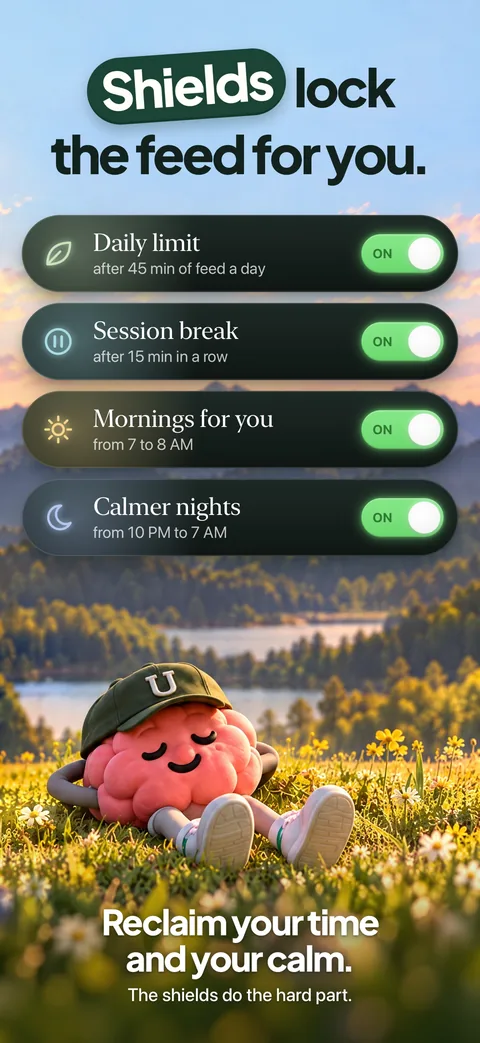
Unrotten blocks through Apple's Screen Time framework too, but every shield belongs to a goal. Less scrolling gives the apps you choose, your rot apps, a daily limit; Shorter scroll sessions makes them take a break once a session runs past the length you set; Mornings for yourself and Calmer evenings protect a window each day. The shield has no "ignore limit" button and holds until the limit resets or the window ends, and a limit you raise mid-day only counts from tomorrow.
Around the shields sits the reason to keep them: an AI Coach, drawn like iOS Messages, that knows your goals and your day (never the names of your apps), sends a morning message and nudges you when your scrolling runs fast. The MindBattery, a score from 0 to 100 on your Lock Screen and in the Dynamic Island, drains while you use your rot apps and recharges with sleep, movement and time away from them.
Compared with Opal: $69.99 a year against $99.99, and it runs on iOS 17. Opal has a free plan and apps for Mac and Android; Unrotten has neither, and it's new, on the App Store since October 14, 2026. It's a commitment device, not a vault: turning a goal off, or removing Unrotten's Screen Time access, lifts that goal's shield.
ScreenZen: best free option
ScreenZen is free, supported by optional tips. Before a chosen app opens you wait, and the wait can grow each time; daily goals, strict blocks and locks on its own settings do the rest. Read our full ScreenZen review.
one sec: best for a pause instead of a wall
one sec plays a breathing animation before a chosen app opens, through a Shortcuts automation, and then lets you decide. It's free for one app, and Pro is $19.99 a year. Its field study is the one cited above [4], though one of the study's three authors created the app.
Brick: best for a lock that lives outside your phone
Brick moves the off switch off your phone: tap your phone on a $59 device to block your apps, and tap it again to get them back. It needs iOS 18, like Opal. Read our Brick review, or our guide to Opal alternatives for more options.
Is Opal worth it?
Opal is a polished, strict blocker, and its free plan is a fair way to find out whether its style suits you. Set your one rule on the hour you lose most, often the last one before bed, and live with it for two weeks. If you keep ending the block early, Pro is where the hardcore difficulty lives, and that's the part worth paying for.
If the trouble is less the access than the pull itself, a wall may not be enough on its own. That's where Unrotten's goals, Coach and MindBattery come in. And if your phone use comes with low mood, anxiety or sleep problems that last, a doctor or therapist can help.
Questions people ask
Is the Opal app free?
Yes. Opal has a free plan with no end date. On October 29, 2026, its pricing page listed one rule (a schedule, a time limit or an open limit), app blocking, basic timers and soundscapes, and the Opal Score for today only. Unlimited rules, the strictest difficulty and the score's history need Opal Pro.
How much does Opal Pro cost?
On Opal's pricing page in October 2026, Pro cost $99.99 a year with a free week, $19.99 a month with three free days, or $399 once for life, with up to 50% off for students. The US App Store also lists weekly plans at $4.99 and $9.99, so check the price on the paywall before a trial starts.
Can you bypass Opal?
Not easily on its strictest setting. Opal's help centre says the "No way, I'm hardcore" difficulty, part of Opal Pro, won't let you take a break or end a session early, except once a week, and App Uninstall Protection stops you from deleting Opal during a blocking session. On easier difficulties you can snooze or end a session.
Does Opal work on older iPhones?
Opal needs iOS 18 or later on an iPhone, according to its App Store listing in October 2026. It also has apps for Mac and Android.
Is Opal worth it?
If you want strict, scheduled blocking and the free plan's single rule isn't enough, Pro buys unlimited rules and the hardcore difficulty. If $99.99 a year is too much, your iPhone can't run iOS 18, or you want help with the habit as well as a wall, an alternative may suit you better.
References
- Allcott H, Gentzkow M, Song L. "Digital Addiction." American Economic Review. 2022;112(7):2424-2463. doi:10.1257/aer.20210867 ↩
- Hunt MG, Marx R, Lipson C, Young J. "No More FOMO: Limiting Social Media Decreases Loneliness and Depression." Journal of Social and Clinical Psychology. 2018;37(10):751-768. doi:10.1521/jscp.2018.37.10.751 ↩
- Pieh C, Humer E, Hoenigl A, Schwab J, Mayerhofer D, Dale R, et al. "Smartphone screen time reduction improves mental health: a randomized controlled trial." BMC Medicine. 2025;23(1):107. doi:10.1186/s12916-025-03944-z ↩
- Grüning DJ, Riedel F, Lorenz-Spreen P. "Directing smartphone use through the self-nudge app one sec." Proceedings of the National Academy of Sciences. 2023;120(8):e2213114120. doi:10.1073/pnas.2213114120 ↩
- Parry DA, Davidson BI, Sewall CJR, Fisher JT, Mieczkowski H, Quintana DS. "A systematic review and meta-analysis of discrepancies between logged and self-reported digital media use." Nature Human Behaviour. 2021;5(11):1535-1547. doi:10.1038/s41562-021-01117-5 ↩
Written by
Maren AshbyCOO, Unrotten
Maren Ashby is the COO of Unrotten, the iPhone app that helps people take their attention back from the feed. She writes about the research on phones, sleep and focus, and about the small, practical changes that make a phone easier to put down.