

Blog/Comparison
Brick App Review: Is the $59 Phone Blocker Worth It?
How Brick locks your apps with a tap, what Brick Night adds, where it falls short, and who should choose an app or a lock box instead.


In this article
Brick is a small square you tap your phone against to lock your distracting apps, and tap again to get them back. It goes after the weak spot of blockers that live on your phone: the way out is usually right there, under the same thumb that wants to scroll. Whether it's worth $59 depends on how you slip, and on where you'd leave it.
Disclosure: Unrotten, one of the alternatives below, is made by the team behind this blog. We checked Brick on October 28, 2026, against its US App Store listing and its official website, and every other app against its own listing and site. We didn't lab-test anything: every price, rating and feature here comes from those pages.
Brick at a glance
- What it is: a small NFC device plus a free app for iPhone and Android, made by Brick LLC. The app has been on the App Store since September 2023.
- Price: $59 once for the Brick. Brick Night, a version for the bedroom, is $129. The app has no in-app purchases.
- Needs: an iPhone on iOS 18 or later, or an Android phone on Android 12 or later.
- Rating: 4.9 stars from about 59,000 US App Store ratings.
- Best for: people who keep tapping past their own limits and want the off switch somewhere else.
- Watch out for: it's only as far away as the place you leave it.
How Brick works
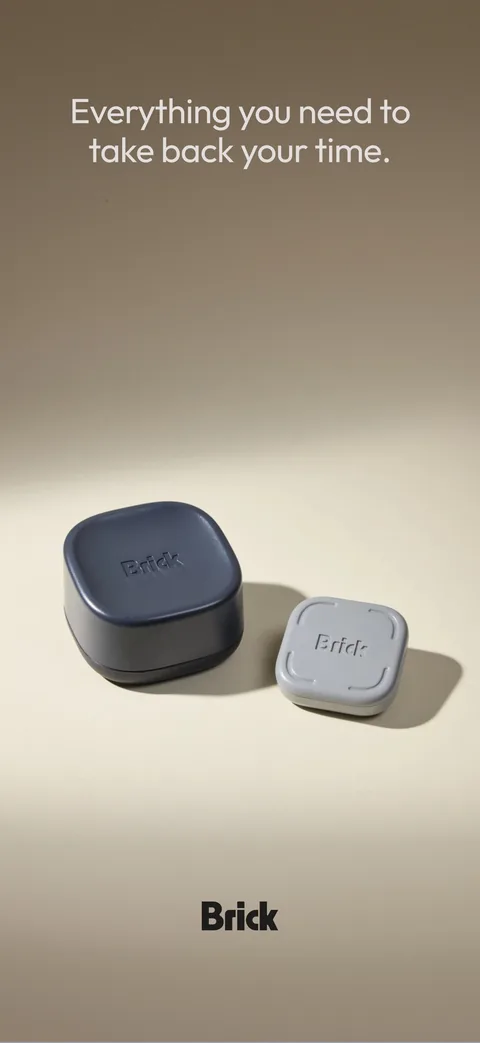
Setup happens in the app. You choose what to block (any app except the phone dialer, per Apple's policy, plus websites in Safari) and save it as a mode, such as Work, Family, Sleep, Gym or Study. Then you tap your phone on the Brick. The apps you chose disappear from your phone, notifications included, and stay gone until you tap the Brick again.
That's the whole trick. Many blockers that live on your phone can be switched off in a second, and as Brick's App Store listing puts it, "Brick isn't on the phone you're trying to put down." Leave it on the fridge, in a desk drawer or at the office, and getting your apps back means walking there.
Brick doesn't ask for willpower in the moment. It asks for a walk.
A few details make it stricter than it first looks:
- Strict Mode stops you from deleting the app or changing its settings to get out of a session, the loopholes Brick says it built the mode to close.
- Schedules start blocks on their own, say every weekday at 9 a.m. A schedule can be set to end only with a tap on the Brick; without one, the app warns, you'll need an emergency unbrick to end the session.
- Brick from anywhere: forgot to tap before leaving home? Hold the virtual Brick on the app's home screen for five seconds and your phone is Bricked. Unbricking still takes a tap on the real one.
- Five Emergency Unbricks come with the app, for real emergencies or a lost Brick. When they run out, Brick's FAQ says to email the company and request five more.
There's also a focus timer and a history of your sessions.
Brick Night: the bedroom version
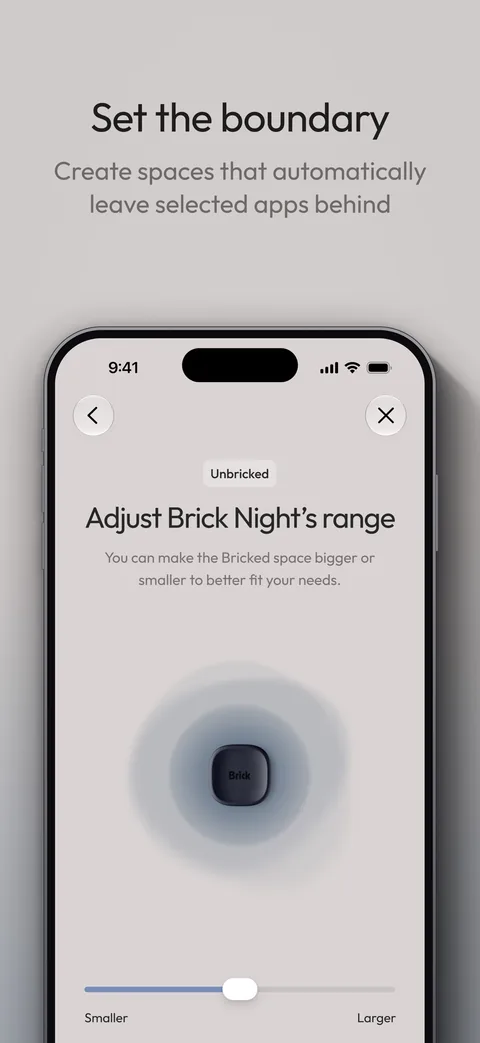
Brick Night ($129) needs no tap. It stays in your bedroom and uses Bluetooth to tell when you're in the room, then blocks the apps you chose during the hours you set. You can make its range larger or smaller to fit the space. If your worst scrolling happens in bed, it's the more targeted of the two, at more than twice the price. Our guide to revenge bedtime procrastination explains why the night is so hard to give up.
What Brick costs
US prices on Brick's website, October 28, 2026:
- Brick: $59.
- Brick Night: $129.
- Brick and Brick Night together: $169 on sale (regular $188).
- The Brick app: free, with no in-app purchases.
It's a one-time cost: no subscription, nothing to renew. Free shipping starts at $75, which a single Brick doesn't reach, and Brick offers a 30-day money-back guarantee. Its App Store listing adds that HSA and FSA funds can pay for Brick and Brick Night through Truemed, for customers who qualify.
Does a physical blocker actually work?
Nobody has run a trial of Brick itself, but the two ideas behind it have been tested.
Distance may help, though less than it was once claimed. In a well-known 2017 experiment with nearly 800 smartphone users, people took tests of memory and reasoning with their phone on silent: face down on the desk, in a pocket or bag, or in another room. Those whose phone was in another room did best, significantly better than the desk group and slightly better than the pocket group [1]. A preregistered replication in 2022 found no difference between the three [2]. A small 2023 experiment with 42 students did find lower attention scores when their phone lay switched off and face down on the desk than when it was outside the room [3]. The honest summary: keeping the phone in another room is cheap and may help, but the evidence that its mere presence drains you is mixed.

Limits you can't easily undo get used. When economists gave people in a randomized experiment a way to set limits on their own future screen time, it substantially reduced their use. Their model suggests self-control problems cause about 31% of social media use [4]. Brick is that kind of limit in physical form: a commitment device, a choice you make now that makes giving in harder later. Apple's built-in limits work the other way round. By default, Apple's guide says, "Screen Time limits can be ignored once reached" [5].
A limit you can undo in a second is a suggestion. A limit in another room is a decision.
Where Brick falls short
Brick is good at one job, and its weak spots follow from that:
- The barrier is only as far away as the Brick. Brick works best with a fixed home, like a drawer at work or a hook by the door. If it rides in your bag, unbricking is a reach away.
- It's another thing to keep track of. Lose it, and five emergency unbricks are your way out until you email for more.
- It's a blocker, not a coach. Brick's feature list is modes, schedules, a focus timer and usage history. Nothing in it works on why you reach for the phone, or on what to do with the hour you get back.
Brick vs the alternatives
| Option | Price (US) | How it blocks | Free version | App Store rating (US) |
|---|---|---|---|---|
| Brick | $59 once for the device; free app | Tap your phone on the Brick (NFC) to start and end a block | No (needs the device) | 4.9 (59K ratings) |
| Brick Night | $129 once | Blocks chosen apps when you're in your bedroom (Bluetooth) | No | Same app as Brick |
| Unrotten | $69.99/yr after a 7-day free trial, or $14.99/mo | Screen Time shields tied to goals: a daily limit, session breaks, protected hours | No (7-day free trial) | New (October 2026) |
| Opal | Free plan; Pro $99.99/yr, $19.99/mo or $399 once | Screen Time blocks, limits and schedules; Deep Focus can't be cancelled | Yes (1 rule) | 4.7 (90K ratings) |
| Apple Screen Time | Free, built in | Daily limits and Downtime; limits can be ignored by default | Yes | Built into iOS |
Checked October 28, 2026, on the US App Store and each maker's website.
Unrotten: best if you want the habit to change, not just the access
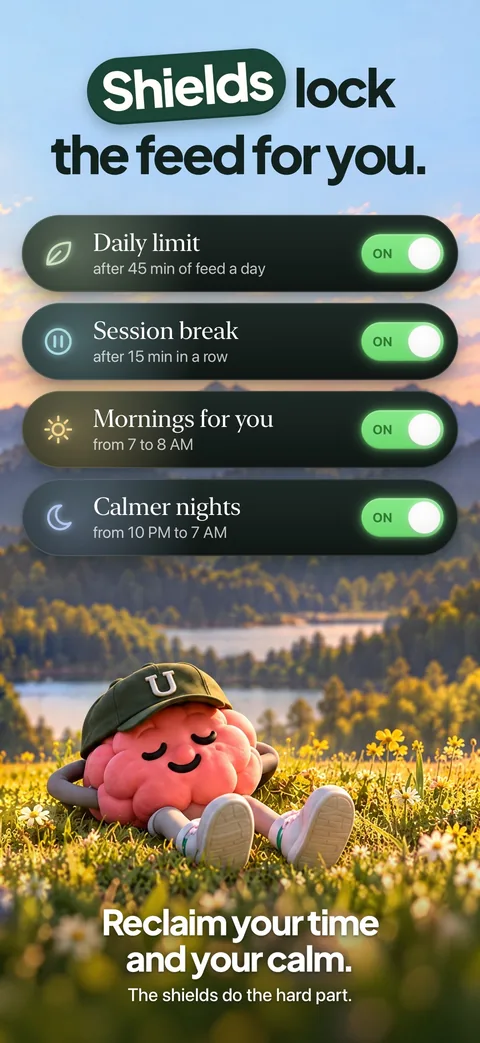
Unrotten keeps the firmness on your phone and adds a reason to use it. You choose your rot apps, the ones that eat your time, and turn on goals: Less scrolling gives them a daily limit, Shorter scroll sessions makes them take a break after a session length you set, and Calmer evenings or Mornings for yourself protect a window each day. The shield that locks them has no "ignore limit" button and holds until the limit resets or the window ends, and a limit you raise mid-day only counts from tomorrow.
The closest thing to a Brick session is a phone-free session from Home's + button: Work, Focus or Reading, with your rot apps locked until it ends and a countdown on the Lock Screen and in the Dynamic Island. Around the shields: an AI Coach that sends a morning message, checks in on the plans you share and nudges you when the scrolling runs fast, and a MindBattery score that drains with your rot apps and recharges with sleep, movement and time away.
Watch out for: there's no free tier, only a 7-day free trial on the yearly plan. It's new, on the App Store since October 14, 2026. And because the key isn't in another room, it's a commitment device rather than a vault: turning a goal off, or removing its Screen Time access, lifts that goal's shield.
Opal: best for strict blocking without a device
Opal blocks apps and websites through Apple's Screen Time framework, on schedules, after time limits or after a number of opens. Its App Store listing says Deep Focus "won't let you cancel or bypass at all," which is as close as an app gets to a Brick you left at home. The free plan includes one rule; Pro costs $99.99 a year, $19.99 a month or $399 once. It needs iOS 18, like Brick, and also runs on Android and Mac. Our guide to Opal alternatives compares it with eight others.
A timed lock box: best for locking away the whole phone
If the apps aren't the problem so much as the phone itself, a box with a timer locks the entire device until the countdown ends, calls and maps included. See our guide to phone lock boxes.
Apple Screen Time: the free first step
Every iPhone can set daily app limits and a Downtime schedule in Settings, then Screen Time, for free. The catch is the default quoted above [5]: a Screen Time passcode can make the limits hold, but only if someone else keeps the code.
Is Brick worth it?
Brick is worth $59 if three things are true: you've already tried app limits and kept tapping past them, you have a place to leave the device that's genuinely out of the way, and you'd rather pay once than subscribe. For many people that's the desk drawer during work hours, or Brick Night for the bedroom.
Look elsewhere if your iPhone can't run iOS 18, or if you'd end up carrying the Brick everywhere. And if the problem is less the access than the pull itself, the 11 p.m. "just checking" that becomes an hour, Unrotten's goals and Coach work on the habit while the shields hold the line.
Whichever you pick, set it up around your worst hour and give it two weeks before you judge it.
Questions people ask
How does Brick work?
You choose the apps to block in the free Brick app, then tap your phone on the Brick, a small NFC device. The apps disappear, notifications included, until you tap the Brick again. Leave it in another room and getting your apps back means walking there.
Does Brick have a subscription?
No. The Brick costs $59 once and Brick Night $129 once (October 2026), and the Brick app's App Store listing shows no in-app purchases. Shipping is free on orders over $75, and Brick offers a 30-day money-back guarantee.
What happens if you lose your Brick?
The app includes five Emergency Unbricks for emergencies and lost devices. When they run out, Brick's FAQ says you can email the company to request five more.
Is Brick worth it?
If you keep tapping past your own app limits and you have a fixed place to leave the device, a one-time $59 for a physical barrier is good value. If you'd carry it everywhere, your iPhone can't run iOS 18, or you want help changing the habit itself, an app may suit you better.
Brick or Opal: which is better?
Brick puts the off switch outside your phone for $59 once. Opal is an app with a free plan and Pro at $99.99 a year, whose Deep Focus sessions can't be cancelled. Choose Brick for physical distance and no subscription, Opal for strict blocking without a device.
References
- Ward AF, Duke K, Gneezy A, Bos MW. "Brain Drain: The Mere Presence of One's Own Smartphone Reduces Available Cognitive Capacity." Journal of the Association for Consumer Research. 2017;2(2):140-154. doi:10.1086/691462 ↩
- Ruiz Pardo AC, Minda JP. "Reexamining the 'brain drain' effect: A replication of Ward et al. (2017)." Acta Psychologica. 2022;230:103717. doi:10.1016/j.actpsy.2022.103717 ↩
- Skowronek J, Seifert A, Lindberg S. "The mere presence of a smartphone reduces basal attentional performance." Scientific Reports. 2023;13(1):9363. doi:10.1038/s41598-023-36256-4 ↩
- Allcott H, Gentzkow M, Song L. "Digital Addiction." American Economic Review. 2022;112(7):2424-2463. doi:10.1257/aer.20210867 ↩
- Apple. "Set schedules with Screen Time on iPhone." iPhone User Guide, iOS 26. Accessed October 28, 2026. support.apple.com ↩
Written by
Maren AshbyCOO, Unrotten
Maren Ashby is the COO of Unrotten, the iPhone app that helps people take their attention back from the feed. She writes about the research on phones, sleep and focus, and about the small, practical changes that make a phone easier to put down.