

Blog/Comparison
one sec App Review: Does a Breath Before Your Apps Work?
How one sec's pause works, what the free version and Pro include, what its own studies found, and who needs something firmer.


In this article
one sec makes you breathe before you scroll. Pick the apps that pull you in, and each time you open one, a short breathing animation plays first; when it ends, you decide whether to go in or close the app. It also has peer-reviewed research behind it, and the details of that research say a lot about when a pause is enough.
Disclosure: Unrotten, one of the alternatives below, is made by the team behind this blog. We checked one sec on October 30, 2026, against its US App Store listing, its Google Play listing and its official website, and every other app against its own listing and site the same day. We didn't lab-test anything: every price, rating and feature here comes from those pages.
one sec at a glance
- What it is: a screen time app by riedel.wtf apps S.L., founded by Frederik Riedel, on the App Store since September 2020. It also runs on Android and Mac, with browser extensions for Chrome, Firefox, Safari and Edge.
- Price: free for one app. one sec pro is $19.99 a year, $6.99 a month or $99.99 once, with a one-week free trial.
- Needs: iOS 15 or later, and a short setup in Apple's Shortcuts app.
- Rating: 4.8 stars from about 23,800 US App Store ratings.
- Best for: the thumb that opens Instagram before you've decided to.
- Watch out for: a pause delays you; on a determined night, you can still go in.
How one sec works
A breath before the app opens
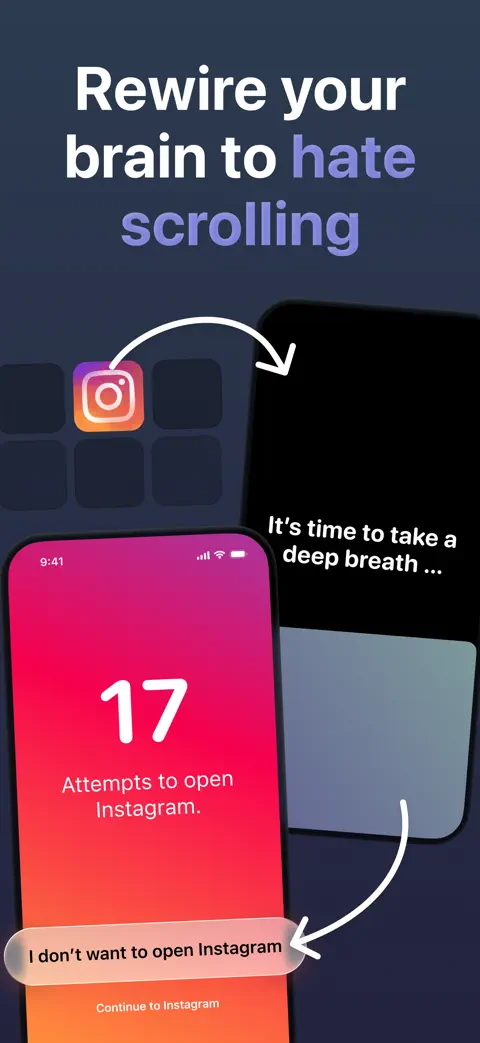
On iPhone, one sec works through an automation in Apple's Shortcuts app that runs whenever one of your chosen apps opens. A full-screen pause comes first, a deep breath by default, with a count of your recent attempts to open the app; then you choose to continue or to close it. The pause doesn't have to be a breath. The latest version lists exercises such as Follow the Dot, Math, Rotate Phone and typing, and one sec's website adds a mirror, a short reflection and 4-7-8 breathing. It can also ask why you're opening the app, check in on how you feel, and nudge you toward something healthier instead.

A brake for the scroll
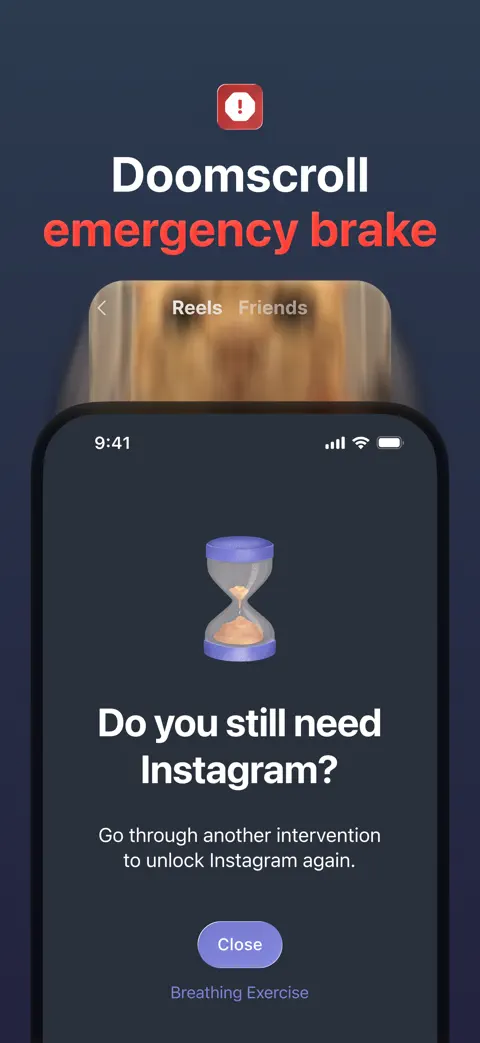
If you get past the pause and lose track of time, Re-Intervention, which one sec calls its Doom Scroll Emergency Brake, kicks you out after a set time, five minutes for example. To unlock more time, you go through the pause again.
Blocks, when a pause isn't enough
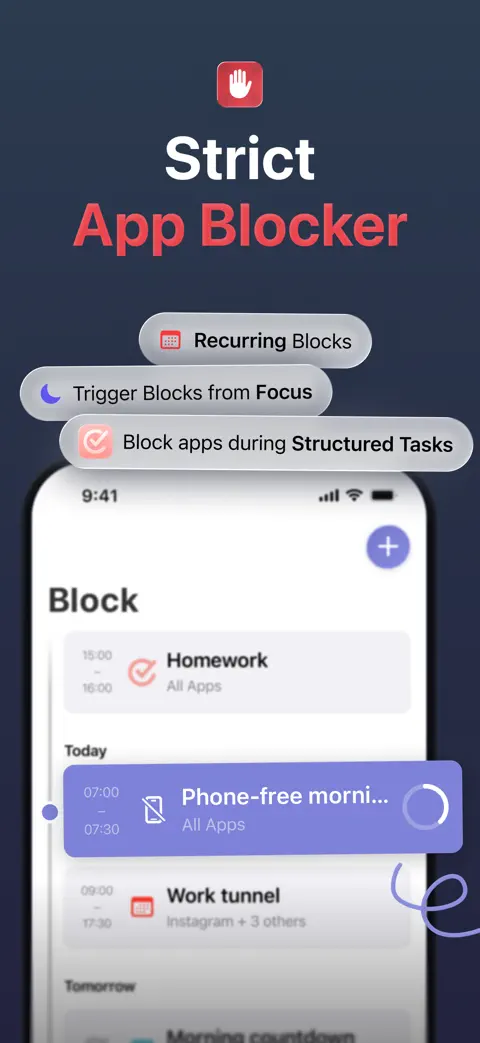
one sec can also block apps and websites outright, during a block session or on a schedule, so that they can't be opened at all. You can block by category, such as Social Media, Games or News. Its App Store screenshots show recurring blocks, blocks that start with an iPhone Focus, and blocks that hold while your tasks in the planner app Structured are unfinished.
Beyond the iPhone
A free Safari extension brings the pause to websites. There's also an Android app, a Mac app for distracting desktop apps, and extensions for Chrome, Firefox, Safari and Edge. On Android, its Google Play listing adds blockers for YouTube Shorts and Instagram Reels that keep the rest of each app.
What one sec costs
Using one sec with one app is free. one sec pro, for unlimited apps and the rest of the features, costs $19.99 a year, $6.99 a month or $99.99 once on the US App Store, with a one-week free trial according to its website. Family plans are $29.99 a year, $9.99 a month or $149 once. The website lists its prices in euros and notes that they differ by region, so check the price in the app before you pay.
Its App Store privacy label, which developers fill in themselves, lists only usage data, not linked to your identity and used for analytics, and no data used to track you.
Does one sec work?
one sec has been tested in two peer-reviewed studies of its own.
In daily use, the pause cut openings. The first, published in the Proceedings of the National Academy of Sciences in 2023, recruited 719 new one sec users on iPhone through a message inside the app, and 280 of them kept using it for all six weeks. When those people tried to open an app they had chosen, they closed it again after the pause 36% of the time. They also tried to open those apps less often: by the sixth week, 37% less than in the first. Together, their actual openings of the apps fell by 57%, and afterwards they reported spending less time in them and being more satisfied with how they used them [1].
In a controlled experiment, the way out did the most. To see which part of the pause mattered, the same team ran a preregistered online experiment in which 500 people watched real, viral social media clips. Being offered the option to skip had the strongest effect; the waiting time also cut viewing; the reflective message on its own made no difference [1].
A pause doesn't stop you. It hands the decision back to you, and much of its effect comes from making leaving easy.
Over months, it kept working, with breaks. The second study followed 1,039 one sec users for an average of 13.4 weeks. Most of them pointed it at social media apps. The pauses cut how often people tried to open those apps and made the openings that remained more intentional over time. People also took breaks from the interventions now and then, and when they returned, they quickly came back from a pattern of overuse [2].
Read the numbers with three caveats. The six-week study had no control group: people were compared with their own first week. The 280 who stayed for all six weeks may be the people it suited best, and everyone in it had chosen to install the app, which the authors themselves call a self-selection bias. And one sec's creator, Frederik Riedel, is an author of both studies, which the 2023 paper discloses [1, 2]. Note, too, that one sec's App Store listing says app usage drops by 57% on average; the study's 57% counted openings, not time.
The moment it targets is the right one. In a study that filmed 37 people's days through wearable cameras, 89% of the times they used their phones were started by the users themselves, not by a notification [3]. one sec steps in exactly there, at the reach. It also counts your attempts, which helps, because people's own estimates of their phone use match what their devices record only moderately [4].
Firmer limits help when a pause isn't enough. In a 12-week experiment with about 2,000 American adults on Android phones, people offered daily limits that took effect the next day and mostly couldn't be overridden in the moment cut their time on social apps, browsers and YouTube by 22 minutes a day, or 16% [5]. That's the kind of rule one sec's blocks, and the alternatives below, add on top of a pause.
Where one sec may not suit you
- If you need a wall. A pause hands you the choice, and on a tired night you can still choose the feed. The blocks hold, but you have to set them up.
- If setup puts you off. On iPhone it runs through an automation in Apple's Shortcuts app, which you set up yourself.
- If you want several apps free. The free version covers one app.
one sec vs the alternatives
| App | Price (US) | How it blocks | Free version | App Store rating (US) |
|---|---|---|---|---|
| one sec | Free for 1 app; Pro $19.99/yr, $6.99/mo or $99.99 once | A pause before chosen apps open; a brake after a set time; blocks on a schedule | Yes (1 app) | 4.8 (23,800 ratings) |
| Unrotten | $69.99/yr after a 7-day free trial, or $14.99/mo | Screen Time shields tied to goals, with an AI Coach | No (7-day free trial) | New (October 2026) |
| ScreenZen | Free; optional tips | A wait before apps open that can grow each time; strict blocks; locked settings | Yes, all features | 4.9 (52,800 ratings) |
| Opal | Free plan; Pro $99.99/yr, $19.99/mo or $399 once | Screen Time rules on schedules, time limits and open limits; Deep Focus sessions can't be cancelled | Yes (1 rule) | 4.7 (90,600 ratings) |
Checked October 30, 2026, on the US App Store and the makers' own websites.
Unrotten: best if you want a reason to stay out, not only a pause
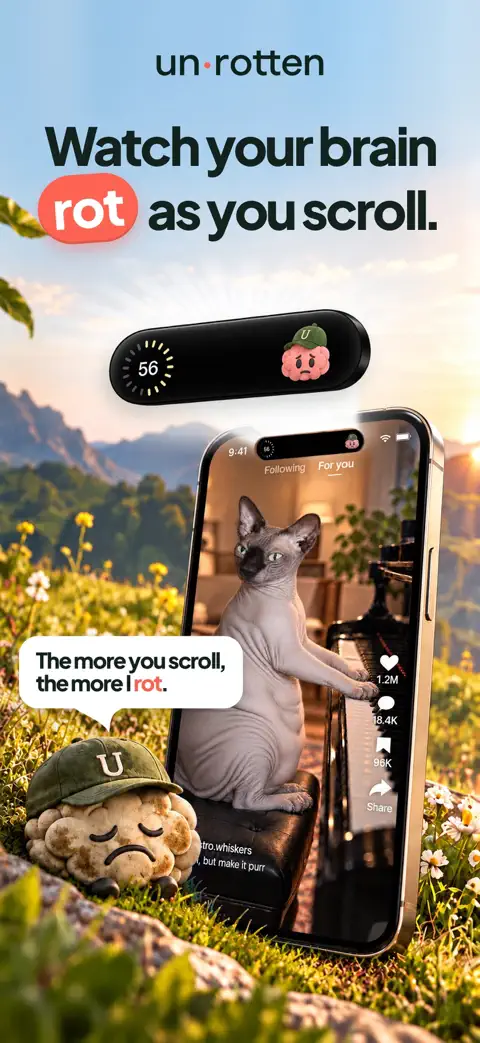
one sec asks its question at the door. Unrotten keeps the cost of the scroll in sight while you're in it: the MindBattery, a score from 0 to 100 in the Dynamic Island, on your Lock Screen and in Home Screen widgets, drains while you use the apps you've chosen and recharges with sleep, movement, mindful minutes and time away from them.
Its goals set the rules: a daily limit (Less scrolling), a session length (Shorter scroll sessions) or a daily number of opens (Fewer app returns), the last one aimed at the same reflex one sec targets. When you reach one, Apple's Screen Time shield locks those apps, with no "ignore limit" button, until the limit resets or the break ends. An AI Coach, drawn like iOS Messages, sends a morning message, checks in on the plans you share and nudges you when scrolling runs fast.
Compared with one sec: Unrotten isn't free: it's $69.99 a year after a 7-day free trial, or $14.99 a month. It's an iPhone app (iOS 17 or later), with no Android, Mac or browser version, and it's new, on the App Store since October 14, 2026. Its shields lock rather than pause, though turning a goal off lifts that goal's shield.
ScreenZen: the free pause with strict extras
ScreenZen also makes you wait before an app opens, and the wait can grow each time. It's free, with strict blocks and locked settings for the moments a wait isn't enough. Read our ScreenZen review.
Opal: for sessions you can't cancel
Opal blocks on schedules, time limits and open limits, and its strictest sessions can't be ended early. Read our Opal review, or compare the options built for social apps in our guide to the best social media blocker apps.
Is one sec worth it?
For one app, it costs nothing to find out. Pick the app you open most without meaning to, switch the pause on and look at your attempts after two weeks. If the count is falling and the openings that remain are on purpose, you've found your tool.
If you catch yourself breathing through the pause and scrolling anyway every evening, the pause isn't firm enough for your habit. Try one sec's scheduled blocks, or a daily limit in Unrotten whose shield holds until the day resets.
Questions people ask
Is one sec free?
Yes, for one app. On October 30, 2026, one sec pro, which covers unlimited apps and more features, cost $19.99 a year, $6.99 a month or $99.99 once on the US App Store, and one sec's website listed a one-week free trial.
How does one sec work?
When you open an app you've chosen, one sec shows a short pause first, a deep breath by default, and then lets you continue or close the app. On iPhone it runs through an automation you set up in Apple's Shortcuts app. It can also kick you out of an app after a set time and block apps on a schedule.
Does one sec really work?
In a peer-reviewed six-week study of 280 users, actual openings of the apps they chose fell by 57%, and a second peer-reviewed study followed 1,039 users for about 13 weeks and found fewer attempts to open those apps. one sec's creator co-wrote both studies, and the six-week study had no control group.
Does one sec work on Android and Mac?
Yes. one sec has an Android app, a Mac app and browser extensions for Chrome, Firefox, Safari and Edge. On iPhone it needs iOS 15 or later.
Can you get around one sec?
By design, yes: the pause delays you rather than locking the app, so you can wait it out and go in. Its blocks are firmer. During a block session or a scheduled block, its website says, the apps you chose can't be opened at all.
References
- Grüning DJ, Riedel F, Lorenz-Spreen P. "Directing smartphone use through the self-nudge app one sec." Proceedings of the National Academy of Sciences. 2023;120(8):e2213114120. doi:10.1073/pnas.2213114120 ↩
- Haliburton L, Grüning DJ, Riedel F, Schmidt A, Terzimehić N. "A Longitudinal In-the-Wild Investigation of Design Frictions to Prevent Smartphone Overuse." Proceedings of the CHI Conference on Human Factors in Computing Systems. 2024:1-16. doi:10.1145/3613904.3642370 ↩
- Heitmayer M, Lahlou S. "Why are smartphones disruptive? An empirical study of smartphone use in real-life contexts." Computers in Human Behavior. 2021;116:106637. doi:10.1016/j.chb.2020.106637 ↩
- Parry DA, Davidson BI, Sewall CJR, Fisher JT, Mieczkowski H, Quintana DS. "A systematic review and meta-analysis of discrepancies between logged and self-reported digital media use." Nature Human Behaviour. 2021;5(11):1535-1547. doi:10.1038/s41562-021-01117-5 ↩
- Allcott H, Gentzkow M, Song L. "Digital Addiction." American Economic Review. 2022;112(7):2424-2463. doi:10.1257/aer.20210867 ↩
Written by
Maren AshbyCOO, Unrotten
Maren Ashby is the COO of Unrotten, the iPhone app that helps people take their attention back from the feed. She writes about the research on phones, sleep and focus, and about the small, practical changes that make a phone easier to put down.