
Blog/App blockers & screen time apps/Roundup
The Best Apps to Stop Doomscrolling on iPhone in 2026
Nine apps judged on what they do once you're already scrolling: a session cap, a brake mid-feed, a feed without Reels or a price in push-ups.

In this article
Doomscrolling rarely starts with a decision. You open an app for one thing, and forty minutes later your thumb is still moving and your mood is still sinking. Most screen time apps guard the door. This list judges them on what they do once you're already in: whether they end the session, strip the endless part of the feed or make the next minute cost something.
Disclosure: Unrotten, first on this list, is made by the team behind this blog. We checked every other app on November 8, 2026, against its US App Store listing and its official website, and Apple's Screen Time against Apple's iPhone User Guide. We didn't lab-test anything: every price, rating and feature here comes from those pages.
The quick comparison
| App | Price (US) | What stops the scroll | Free version | App Store rating (US) |
|---|---|---|---|---|
| Unrotten | $49.99/yr or $9.99/mo, each after a 7-day free trial | A break once a session runs past the length you set; a daily limit; Coach nudges when scrolling runs fast | No (7-day free trial) | New (October 2026) |
| one sec | Free for 1 app; pro $19.99/yr, $6.99/mo or $99.99 once | A pause before the app opens; an emergency brake that ends a long scroll | Yes (1 app) | 4.8 (23,817 ratings) |
| ScreenZen | Free; optional tips | A wait before opening; a session length; a Minimal mode without Reels or Shorts | Yes, all features | 4.9 (53,459 ratings) |
| SocialLite | Pro listed from $6.99/mo or $19.99/yr | Opens Instagram, YouTube and more inside its own app, without Reels, Shorts or algorithmic feeds | Not stated | 4.7 (17,477 ratings) |
| Clearspace | Free; Premium $6.99/mo or $44.99/yr | Asks how long you'll stay, from 1 to 10 minutes; push-ups or a breath for more | Yes (free features not listed) | 4.7 (8,966 ratings) |
| Opal | Free plan; Pro $99.99/yr, $19.99/mo or $399 once | Time limits, open limits and schedules; Deep Focus can't be cancelled | Yes (1 rule) | 4.7 (91,125 ratings) |
| Brainrot | Subscription required; plans listed from $3.99 | A nudge before you scroll; a brain avatar that decays as you doomscroll | No | 4.5 (22,849 ratings) |
| Pushscroll | Subscription required; $14.99/mo, yearly plans listed from $24.99 to $59.99 | A budget of minutes you earn with exercise: one push-up, one minute | No | 4.7 (18,017 ratings) |
| Apple Screen Time | Free, built in | Daily limits and schedules, which by default can be ignored once reached | Yes | Built into iOS |
Checked November 8, 2026, on the US App Store, each maker's website and Apple's iPhone User Guide.
What ends a scroll, according to the research
A feed has no last page, so the decision to stop is left to you, and you rarely make it from inside the feed. When researchers followed 46 people's social media use for a week, most of the reasons people gave for putting the phone down came from the rest of their day, not from the app [1]. Our guide to infinite scroll explains why the design works that way.
What helps is giving the feed edges. In a study that gave 43 people a custom Twitter app, small design changes, including a dialog when they reached a time limit and a running count of their own use, reduced the blank, absorbed scrolling that left people feeling they had taken in nothing [2]. Portions work the same way on other appetites: in a set of experiments, people went through chocolates more slowly when the same amount came split into smaller portions, and each partition worked as a small decision point [3].
The door still matters. In a study of 280 people using one sec, the app's pause led them to close the app they had reached for on 36% of attempts, and by the sixth week they tried to open those apps 37% less than in the first, though that stretch had no comparison group and the app's creator co-wrote the paper [4]. Limits you set in advance get used, too: in a 12-week experiment with about 2,000 American Android users, 78% of those offered a tool for limits on their own phones set limits that bit, and their time on social apps, browsers and YouTube fell by 16% [5].
The stakes are more than time. In two studies, one in a lab and one following people through their days, scrolling Facebook passively, reading without posting or messaging, lowered people's mood over time, and envy explained the drop [6].
The open takes a second. The scroll takes the evening, so judge an app by what it does at minute twenty.
The 9 best apps to stop doomscrolling
1. Unrotten: best for ending the session itself
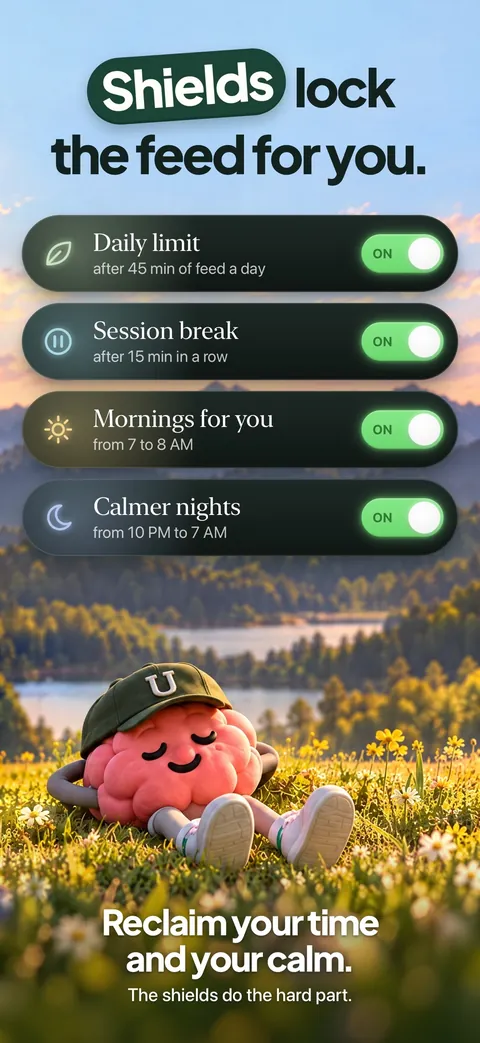
Unrotten is built around the stretch other apps miss. You choose your rot apps, the ones that eat your time, and Shorter scroll sessions sets how long a session may run: past it, Apple's Screen Time shield makes those apps take a break before they open again. Less scrolling adds a daily limit that locks them until the day resets, and the shield has no "ignore limit" button.
While you scroll, the MindBattery™, a score from 0 to 100 on your Lock Screen and in the Dynamic Island, drains while you use your rot apps, and the AI Coach, a chat drawn like iOS Messages, nudges you when your scrolling runs fast. Calmer evenings protects a window each night without them.
Best for: people who lose an hour once they're in, and want a reason to stop as well as a wall.
Watch out for: there's no free tier: it's $49.99 a year or $9.99 a month, each after a 7-day free trial. It's an iPhone app (iOS 17 or later) and new, on the App Store since October 14, 2026. Turning a goal off, or removing Unrotten's Screen Time access, lifts that goal's shield.
2. one sec: best for a brake in the middle of a scroll
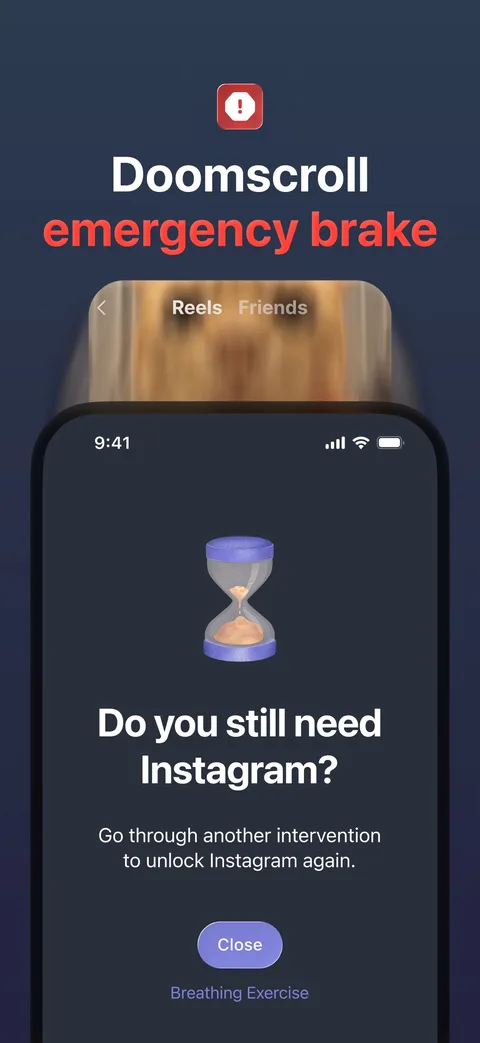
one sec is best known for its pause: it "adds a short pause before distracting apps so you can choose what deserves your attention." For doomscrolling it has something more direct, which it calls the Doom Scroll Emergency Brake: "After a set time (e.g. 5 minutes) you'll be kicked out of social media, and you'll have to go through an intervention again to unlock more time." Its pause has been tested in published research, which the app's creator co-wrote [4].
Best for: the scroll that starts on autopilot and runs long.
Watch out for: free covers one app; one sec pro is $19.99 a year, $6.99 a month or $99.99 once. It runs on iOS 15 or later, has 4.8 stars from 23,817 US ratings, and its privacy label lists no data used to track you.
3. ScreenZen: best free option
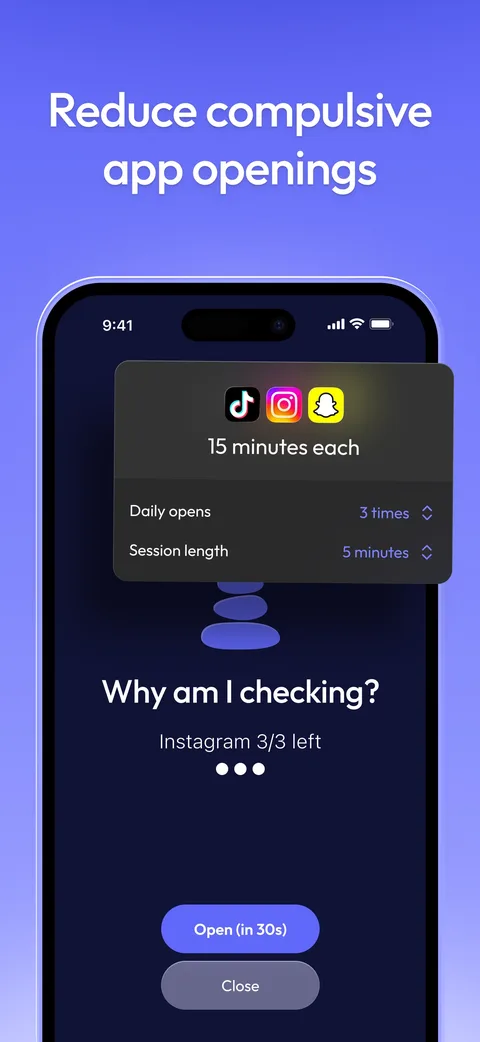
ScreenZen makes you wait before a chosen app opens, and the wait can grow each time. It promises to "interrupt your scrolling" by letting you check apps "for short periods of time so you don't get sucked in," and its screenshots set a session length next to a number of daily opens. Its latest version, from September, lists a Minimal mode for Instagram, YouTube, TikTok, Reddit and more "without Reels, Shorts or endless feeds." Strict blocks, for time ranges or after a number of opens, do the rest.
Best for: solid friction without paying a cent.
Good to know: there's no paywall to weigh: it calls itself "the only donation-supported screen time app," with optional tips from $5 to $40. It runs on iOS 16.4 or later, has 4.9 stars from 53,459 US ratings, and its privacy label lists no data used to track you.
4. SocialLite: best for Instagram and YouTube without Reels
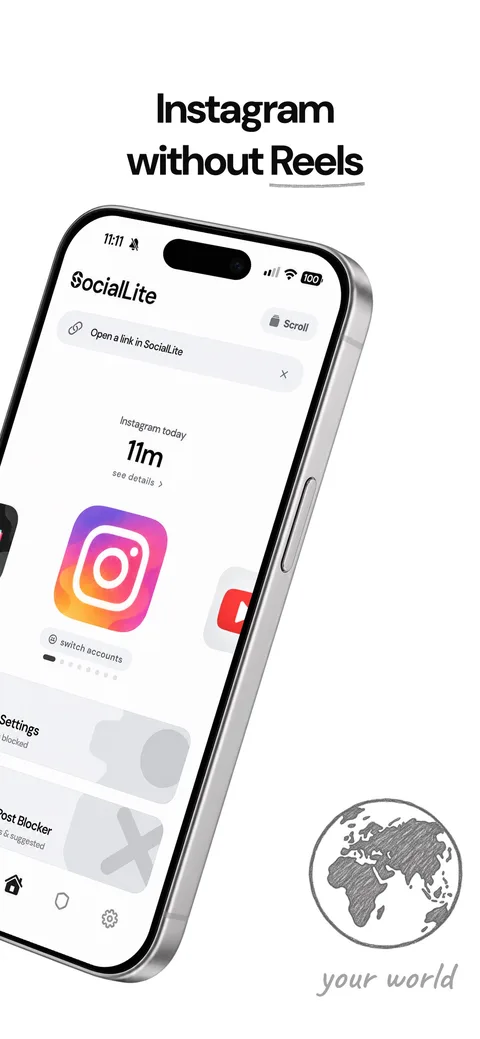
SocialLite goes after the feed itself. iOS doesn't let one app change what happens inside another, its FAQ explains, so SocialLite blocks the native apps and opens your accounts inside its own app, in versions without "algorithmic feeds, Reels, Shorts and endless recommendations." You can still browse and message, and if a friend sends you a video, you can watch that one but can't scroll on to the next. It's plain on purpose: "SocialLite feels slow. That's the point." A Sleep Mode locks your distracting apps from wind-down until after you wake up.
Best for: people whose doomscroll is short video, and who still want their messages.
Watch out for: Pro is listed on the App Store from $6.99 to $17.99 a month or $19.99 to $47.90 a year, and its website publishes neither prices nor what's free. It runs on iOS 17 or later, has 4.7 stars from 17,477 US ratings, and its privacy label lists identifiers among the data that may be used to track you. It's new, on the App Store since January 2026.
5. Clearspace: best for deciding how long before you go in
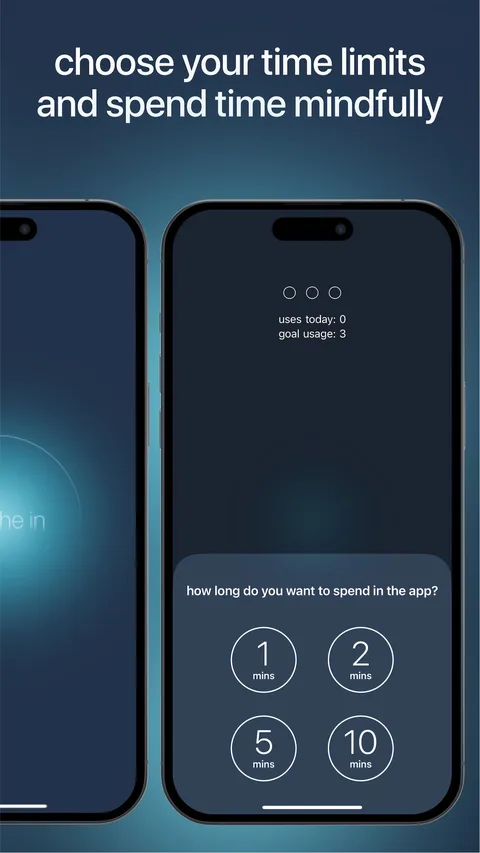
Clearspace's pause comes with a question: how long will you stay? Its screenshots offer 1, 2, 5 or 10 minutes, and its listing promises "session management" that "makes sure you don't scroll for too long." When your time runs out, push-ups or a breathing exercise earn more, its website says.
Best for: people who mean to check for two minutes and stay for twenty.
Watch out for: earning more time is part of the design, so a tired night can turn into push-ups for more feed. Premium is $6.99 a month or $44.99 a year. It runs on iOS 16 or later, has 4.7 stars from 8,966 US ratings, and its privacy label lists contact info and usage data among the data that may be used to track you.
6. Opal: best for a hard stop
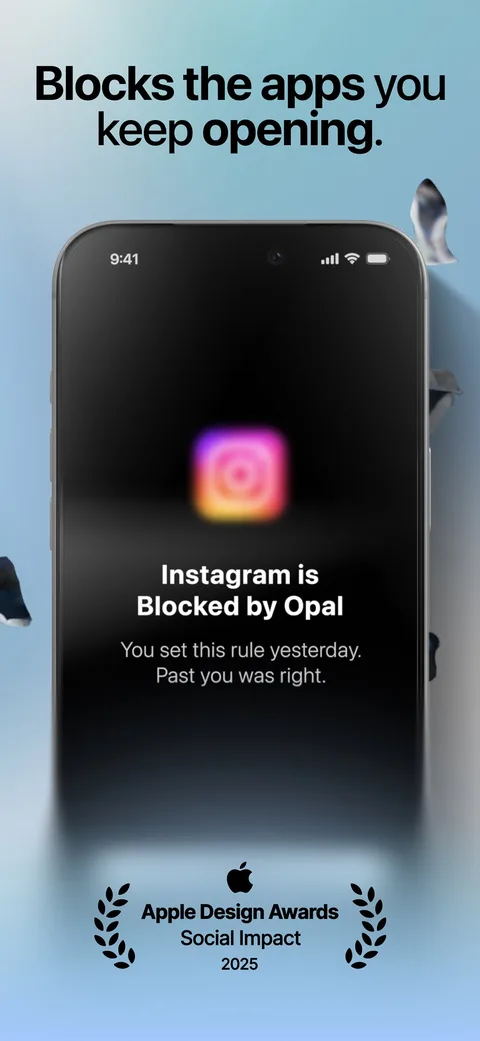
Opal doesn't so much end a scroll as forbid the next one. Time limits and open limits lock apps once you've had your share, schedules lock them at set hours, and Deep Focus "won't let you cancel or bypass at all," says its listing. When you do need an app, a break asks you to write your intention and set a timer.
Best for: people who need a wall they can't talk their way past.
Watch out for: the free plan stops at one rule, and Pro is $99.99 a year, $19.99 a month or $399 once. It needs iOS 18, has 4.7 stars from 91,125 US ratings, and its privacy label lists identifiers among the data that may be used to track you. Here's how it compares with us: Unrotten vs Opal.
7. Brainrot: best for seeing the cost as you scroll
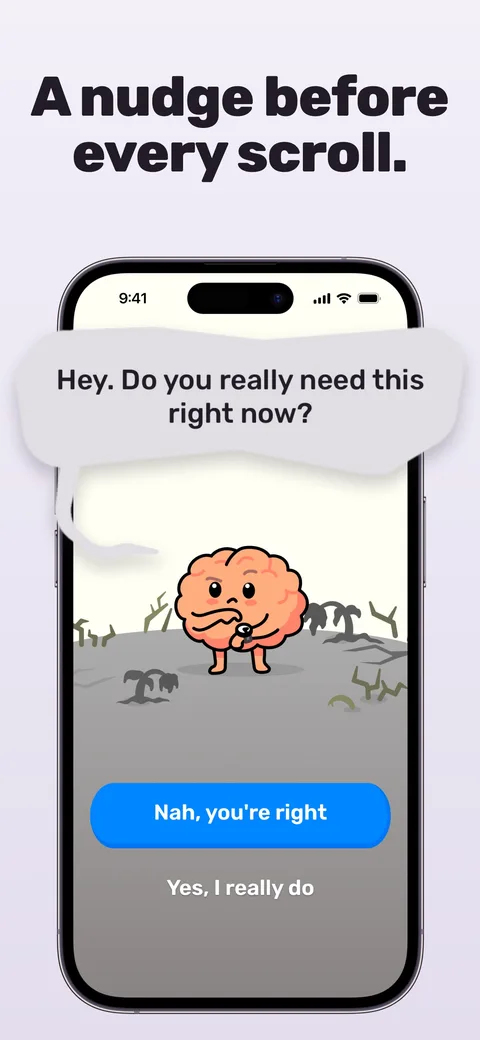
Brainrot puts a face on the scroll. You pick apps and sites to block, set schedules, and "watch your cute brain avatar decay as you doom scroll," says its listing, and its screenshots show a nudge asking whether you really need the app right now.
Best for: people moved more by a picture than a number.
Watch out for: every feature needs a subscription, with plans listed from $3.99. It runs on iOS 17.6 or later and has 4.5 stars from 22,849 US ratings. Its listing says "your browsing data never leaves your phone," while its privacy label lists identifiers among the data that may be used to track you.
8. Pushscroll: best for paying for scrolling in push-ups
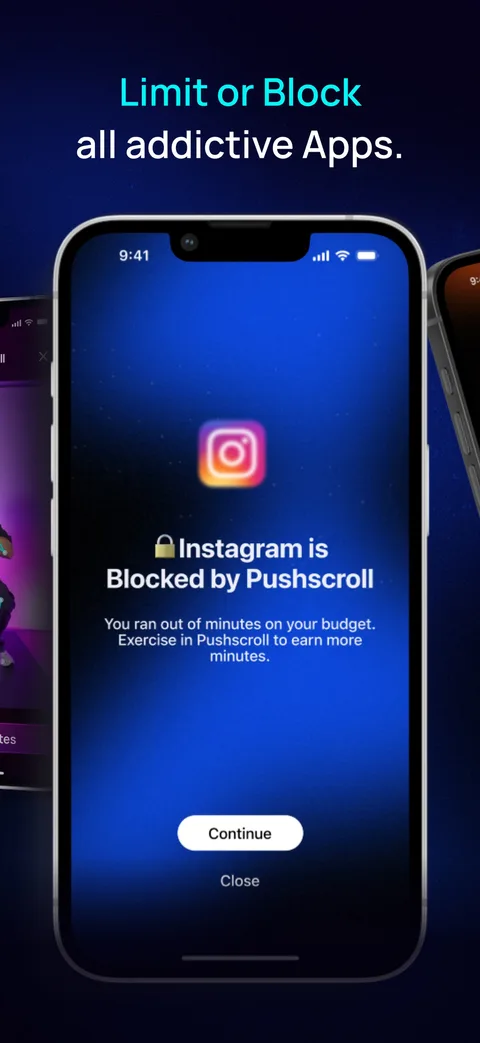
Pushscroll gives the apps you choose a budget of minutes, and when it runs out, its block screen sends you to exercise for more: "One pushup = one minute of app time," says its listing, with squats, lunges and other moves counted by pose detection.
Best for: people who'd rather move than argue with a pop-up.
Watch out for: a subscription is required, at $14.99 a month or yearly plans listed from $24.99 to $59.99. It runs on iOS 16 or later, has 4.7 stars from 18,017 US ratings, and its privacy label lists purchases and identifiers among the data that may be used to track you.
9. Apple Screen Time: the free one already on your phone
Screen Time sets daily limits for apps and categories and schedules time away, with nothing to download. For doomscrolling it has two gaps: it counts the day, not the session, and "by default, Screen Time limits can be ignored once reached," says Apple's iOS 26 guide. On iOS 27, the same tools are called Time Allowances and Screen Time Schedules.
Best for: trying a limit for free before you pay for anything.
Watch out for: limits you can skip by default. Apple's guide explains how a Screen Time passcode makes Downtime block apps instead.
When the doomscroll happens in bed
Night is when a scroll runs longest. In a study that followed 683 university students for six months, problematic phone use predicted more bedtime procrastination later, and bedtime procrastination predicted more problematic phone use [7]. Our guide to revenge bedtime procrastination explains why the last hour of the day is the hardest to give up.
The apps above handle the night differently. Unrotten's Calmer evenings protects a window each day without your rot apps, SocialLite's Sleep Mode locks distracting apps from wind-down until after you wake up, and Opal and ScreenZen can block on a schedule. The cheapest fix works with all of them: charge the phone outside the bedroom.

How to choose
- You lose an hour once you're in: a session cap, from Unrotten or ScreenZen, or one sec's emergency brake.
- You open the feed before you've decided to: a pause, from one sec, ScreenZen or Clearspace.
- Short video is the trap: SocialLite, or ScreenZen's Minimal mode.
- You need a wall, not a nudge: Opal's Deep Focus.
- You'd rather earn your scroll: Pushscroll's push-ups.
- You want a reason to stop, not just a stop: Unrotten's goals, Coach and MindBattery™.
- You want to start free: ScreenZen, one sec for one app, or Apple's Screen Time.
A few changes that cost nothing work alongside any of them. Our guide on how to stop doomscrolling has the ones with studies behind them, from grayscale to batching notifications.

Pick the minute you lose
Each app here works on a different minute: the second before the open, the twentieth minute of the feed, the hour before bed. Find yours in Screen Time's report, which shows when in the day your feed apps run longest, choose the tool built for that minute, and give it two weeks. If it's the session that never ends, Unrotten's session break is built for exactly that minute.
If doomscrolling comes with low mood, anxiety or sleep trouble that lasts, a doctor or therapist can help.
Questions people ask
What is the best app to stop doomscrolling?
It depends on where you lose the time. If an hour disappears once you're in, choose an app that ends the session, such as Unrotten's session break or one sec's Doom Scroll Emergency Brake. If Reels and Shorts are the trap, SocialLite opens Instagram and YouTube without them. If you want it free, ScreenZen costs nothing.
Is there a free app to stop doomscrolling?
Yes. ScreenZen is free and supported by optional tips: it can make you wait before an app opens, keep each visit short and block apps after a number of opens. one sec is free for one app. Apple's Screen Time is built into the iPhone, though by default its limits can be ignored once reached.
Can an app remove Reels from Instagram on iPhone?
Not inside the Instagram app itself. As SocialLite's FAQ explains, iOS doesn't let one app change what happens inside another, so SocialLite blocks the native app and opens your account inside its own app, without Reels, Shorts or algorithmic feeds. ScreenZen also offers a Minimal mode without Reels, Shorts or endless feeds.
How do I stop doomscrolling at night?
Lock your feed apps for the hour before bed with a scheduled window, such as Unrotten's Calmer evenings, SocialLite's Sleep Mode or an Opal schedule, and charge your phone outside the bedroom. In a six-month study of university students, problem phone use and putting off bedtime fed each other.
Do apps to stop doomscrolling actually work?
The best evidence is for pauses and for limits set in advance. In a study of one sec's users, people backed out of opening an app on 36% of their attempts, and in a 12-week experiment, limits people set ahead of time cut their time on social apps, browsers and YouTube by 16%. Choose the app whose brake fits the way you scroll.
References
- Rixen JO, Meinhardt LM, Glöckler M, Ziegenbein ML, Schlothauer A, Colley M, et al. "The Loop and Reasons to Break It: Investigating Infinite Scrolling Behaviour in Social Media Applications and Reasons to Stop." Proceedings of the ACM on Human-Computer Interaction. 2023;7(MHCI):1-22. doi:10.1145/3604275 ↩
- Baughan A, Zhang MR, Rao R, Lukoff K, Schaadhardt A, Butler LD, et al. "'I Don't Even Remember What I Read': How Design Influences Dissociation on Social Media." Proceedings of the 2022 CHI Conference on Human Factors in Computing Systems. 2022:1-13. doi:10.1145/3491102.3501899 ↩
- Cheema A, Soman D. "The Effect of Partitions on Controlling Consumption." Journal of Marketing Research. 2008;45(6):665-675. doi:10.1509/jmkr.45.6.665 ↩
- Grüning DJ, Riedel F, Lorenz-Spreen P. "Directing smartphone use through the self-nudge app one sec." Proceedings of the National Academy of Sciences. 2023;120(8):e2213114120. doi:10.1073/pnas.2213114120 ↩
- Allcott H, Gentzkow M, Song L. "Digital Addiction." American Economic Review. 2022;112(7):2424-2463. doi:10.1257/aer.20210867 ↩
- Verduyn P, Lee DS, Park J, Shablack H, Orvell A, Bayer J, et al. "Passive Facebook usage undermines affective well-being: Experimental and longitudinal evidence." Journal of Experimental Psychology: General. 2015;144(2):480-488. doi:10.1037/xge0000057 · Read our plain-English summary ↩
- Cemei L, Sriram S, Holý O, Rehman S. "A Longitudinal Investigation on the Reciprocal Relationship of Problematic Smartphone Use with Bedtime Procrastination, Sleep Quality, and Mental Health Among University Students." Psychology Research and Behavior Management. 2024;17:3355-3367. doi:10.2147/PRBM.S472299 · Read our plain-English summary ↩
Written by
Maren AshbyCOO, Unrotten
Maren Ashby is the COO of Unrotten, the iPhone app that helps people take their attention back from the feed. She writes about the research on phones, sleep and focus, and about the small, practical changes that make a phone easier to put down.