
Blog/App blockers & screen time apps/Comparison
AppBlock Review: What It Blocks on iPhone, and How Strict It Is
What AppBlock does on an iPhone, what the free version allows, what Premium costs, how firm Strict Mode is, and which alternatives fit better.


In this article
AppBlock blocks the apps and websites you choose on your iPhone: on a schedule, after a time or open limit, or when you arrive at a place. Its standout is Strict Mode, which stops you from undoing your own blocks inside the app. Whether it's right for you depends on how tight a free version you can live with, and on what you want once the apps are locked: just a wall, or a reason to stay away.
Disclosure: Unrotten, one of the alternatives below, is made by the team behind this blog. We checked AppBlock on November 25, 2026, against its US App Store listing, website and help center, and every other app against its own listing and site the same day. We didn't lab-test anything: every price, rating and feature here comes from those pages.
AppBlock at a glance
- What it is: an app and website blocker by MobileSoft, a Czech company, on the App Store since August 2021. It also has an Android app and browser extensions for Chrome, Edge and Brave.
- Price: free, with limits. Premium is $4.99 a month, $29.99 a year (with a 7-day free trial for new subscribers) or $89.99 once on its website; the US App Store lists $4.99 to $11.99 a month and $29.99 to $59.99 a year.
- Needs: iOS 17 or later.
- Rating: 4.6 stars from about 7,100 US App Store ratings.
- Best for: people who know their weak hours and places and want blocks they can't quietly undo inside the app.
- Watch out for: the free version allows two schedules, each on one day of the week, and Strict Mode can't lock your iPhone's Settings.
What AppBlock does on iPhone
AppBlock works through Apple's Screen Time framework, like other iPhone blockers. Schedules run by themselves: you choose the apps and websites, the days and one condition that starts the block. Quick Block is a one-off block you start by hand, from the app, the Control Center or the Action Button.
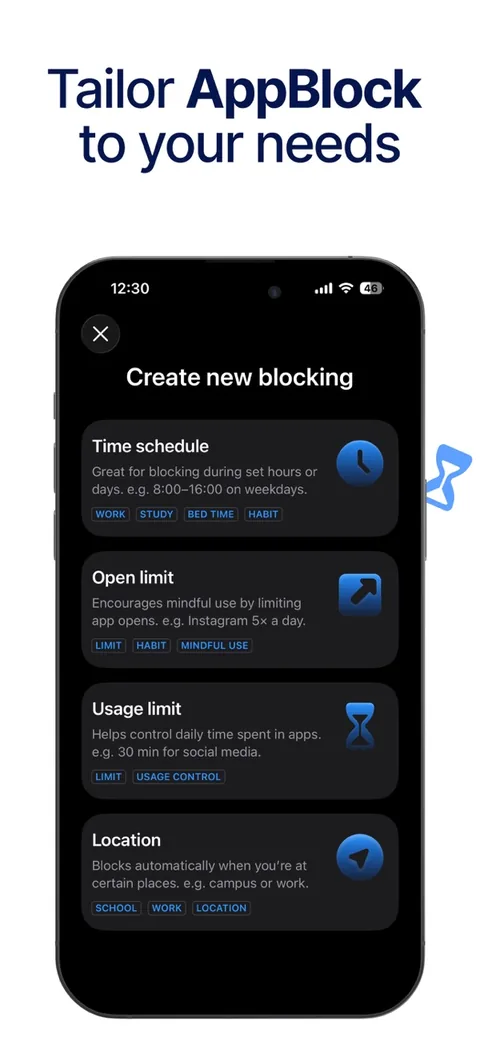
Its help center lists four conditions on iPhone:
- Time schedule: blocks apps during the hours you pick, such as 9 to 5 on weekdays.
- Open limit: blocks apps after a number of opens a day.
- Usage limit: blocks apps after a set amount of use, until midnight.
- Location: blocks apps when you arrive at a place like your office or a library, and unblocks them when you leave.
Only a place and set hours can share one schedule on iPhone; anything else runs as separate schedules, and when two cover the same app, the stricter one wins. The App Store listing also promises blocking "based on time, location, or Wi-Fi," but the help center describes Wi-Fi schedules only for Android. Premium adds an Allowlist: you pick the apps you keep, and AppBlock blocks the rest, though a few system apps, such as Settings, stay open.
Three limits from AppBlock's own help pages are worth knowing before you pay:
- Usage limits rely on Apple's numbers. On iOS 18 and iOS 26, AppBlock says, Screen Time sometimes reports inaccurate usage, "which can cause limits to trigger earlier than expected." It points to the open limit, which doesn't depend on that data.
- Location blocking can lag. Since iOS 18, location schedules sometimes switched on only after the app was opened; AppBlock says that improved in iOS 26.3, "but it can still misbehave on some devices." Its November 11, 2026 update says location-based blocking is more reliable.
- It blocks whole apps. It can't block Reels or Shorts inside an app, and Apple doesn't let it block Phone or Messages.
Websites are blocked through Screen Time too. Safari is fully supported, for whole domains and for keywords (block "tiktok," and any address containing it is out); Chrome, Edge, Firefox and Brave block domains only, and some less common browsers may slip past. Browsers built into other apps aren't blocked, and a website can only be blocked by a time or location schedule.
How strict is Strict Mode?
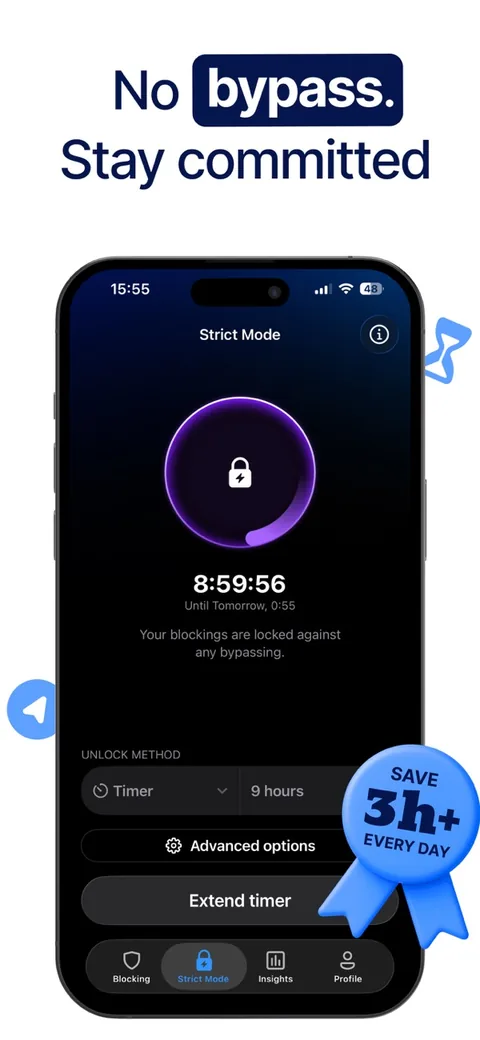
Strict Mode is the heart of AppBlock, its "commitment layer." While it's on, you can't turn off your schedules or Quick Blocks, edit or delete your blocking rules, take apps off the block list, or uninstall AppBlock. Advanced options go further: no uninstalling any app, no App Store, no changing the phone's clock, and no changes to Face ID and passcode settings.
When you switch it on, you choose how it ends:
- Timer: it unlocks when the timer runs out.
- Cooldown: you ask to unlock, then wait a set time.
- Follow schedules: it's on only while your schedules run.
- Approval: a person you trust approves your request, "the strongest option for serious commitments."
- PIN: a code unlocks it.
- Charger: it stays on until you plug your phone in.
For a first try, AppBlock suggests a PIN or the charger, "so you can disable Strict Mode if something feels off." If a timer or your schedules hold you and you truly need out, its support has an emergency unblocking flow, "for real emergencies, not for moments of weakness."
One gap no iPhone blocker can close: "Apple does not allow third-party apps to directly block access to the Settings app or Screen Time," AppBlock's help center says, so Strict Mode can't stop you from withdrawing AppBlock's Screen Time permission there. Its advice, on iOS 26.4 or later, is to have a trusted friend set your Screen Time passcode. Every blocker built on Screen Time shares that gap, Unrotten included: they are commitment devices, not safes.
Does blocking your apps help?
Blockers make sense once you see where self-control gives way:
Media is where willpower loses. In a study that followed 205 adults through 7,827 reports of their desires over a week, desires for media use and work "brought about the most self-control failure" [1].
Changing the situation beats fighting it. Psychologists call this situational self-control: choosing or changing your circumstances before a temptation grows strong, like "the student who goes to the library without a cell phone" [2]. A location schedule is that idea in software, though the authors add that the relative efficacy of these strategies has yet to be established empirically [2].
Limits you set in advance get used. In a 12-week experiment with about 2,000 American adults on Android phones, 78% of the people given a tool to limit their own future use set binding limits and kept them to the end, with no reward for doing so, and the limits cut their time on six apps (Facebook, Instagram, Twitter, Snapchat, YouTube and web browsers) by 22 minutes a day, or 16% [3].

A block only works while it's on. In a randomized trial, adults who blocked all mobile internet on their iPhones for two weeks improved their sustained attention, mental health and well-being. But of the 467 who committed, only 119 kept the block on for at least 10 of the 14 days [4].
Most blockers are walls you can climb. A review of 367 apps and browser extensions found some form of blocking or removing distractions in 74% of them, but only 14% added friction when you tried to remove a block, such as a session that can't be stopped or a password to type first [5]. Strict Mode puts AppBlock in that smaller group.
A block keeps you out of an app. It can't tell you what the hour you get back is for.
What AppBlock costs
The free version is enough to try it, with tight limits on iPhone. AppBlock's own comparison lists them:
- two schedules, each active on one day of the week;
- usage limits of up to 30 minutes a day;
- Quick Block for up to 4 hours;
- Strict Mode timers of up to 12 hours, without the Approval and Follow schedules unlocks.
Premium lifts those limits and adds the Allowlist, pauses, backups, a custom block screen and blocking of in-app purchases. AppBlock's website sells it for $4.99 a month, $29.99 a year with a 7-day free trial for new subscribers, or $89.99 once. On November 25, 2026, the US App Store listed Premium Yearly at $29.99, $44.99 and $59.99 and Premium Monthly at $4.99 and $11.99, so check the price you're shown. A subscription bought on iPhone is renewed, cancelled and refunded through Apple, not AppBlock.
What happens to your data
AppBlock's privacy policy (updated September 17, 2026) says Apple passes the apps and websites you block to AppBlock "only as opaque, encrypted tokens," which its servers can't turn back into names, and that your blocking rules and detailed usage statistics are processed on your phone. The app does share some data with outside services the policy names, among them Firebase for analytics, and Singular and the Meta SDK for measuring its advertising. Its App Store privacy label lists a device ID as data that may be used to track you, and the policy says that tracking waits for your yes in Apple's App Tracking Transparency prompt.
Where AppBlock may not suit you
- If you want to use it for free. Two schedules that each run one day a week and a 30-minute usage limit make the free version a sample; a daily routine needs Premium.
- If you rely on usage limits. Its help warns that Apple's usage data can be off, and the reviews on its App Store page agree: praise for Strict Mode sits beside complaints about limits that kick in too early.
- If you take its numbers at face value. The listing promises "63% less screen time in the first week," then, a few lines down, "in just two weeks"; the website says "in the first month with Strict Mode," citing an AppBlock questionnaire. Its "save up to 3 hours" traces back to a 2025 survey of 779 of its own users, who reported their savings themselves.
- If you want a reason to stop, not just a wall. AppBlock is built around blocking: schedules, limits, places and Strict Mode, with statistics and streaks beside them. Its listing describes no coach and no goals beyond the blocks you set.
AppBlock vs the alternatives
| App | Price (US) | How it blocks | Free version | App Store rating (US) |
|---|---|---|---|---|
| AppBlock | Free; Premium $4.99/mo, $29.99/yr or $89.99 once on its website | Screen Time blocks by schedule, opens, usage or place; Strict Mode | Yes (2 schedules, one day a week each) | 4.6 (7.1K ratings) |
| Unrotten | $49.99/yr or $9.99/mo, each after a 7-day free trial | Screen Time shields tied to goals, for the rot apps you choose | No (7-day free trial) | New (released October 2026) |
| Opal | Free plan; Pro $99.99/yr, $19.99/mo or $399 once | Screen Time rules: schedules, time limits, open limits; Hard Mode (Pro) | Yes (3 rules) | 4.7 (92K ratings) |
| Freedom | Free plan; Premium $39.99/yr or $8.99/mo | Sessions that block apps, sites or the whole internet on all your devices | Yes | 4.5 (6.2K ratings) |
| ScreenZen | Free; optional tips | A wait before chosen apps open, limits and strict blocks | Yes, all features | 4.9 (54.8K ratings) |
| Apple Screen Time | Free, built in | iOS 27: Time Allowances by category and Screen Time Schedules; iOS 26: App Limits and Downtime | Yes | Built into iOS |
Checked November 25, 2026, on the US App Store and each maker's website.
Unrotten: best when you want a reason to stop, not only a wall
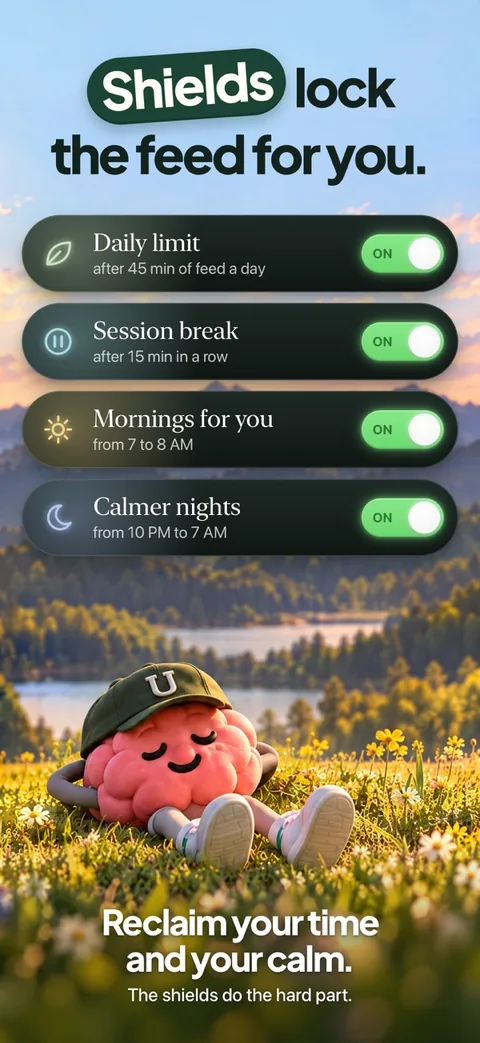
Unrotten starts from the apps that eat your time and the goals you'd rather reach. You choose your rot apps and turn on goals: Less scrolling gives them a daily limit, Shorter scroll sessions makes them take a break after a session length you set, and Time away from apps blocks them during the hours you choose. The shield that locks them has no "ignore limit" button and holds until the limit resets or the window ends.
Around the shield sits the reason to keep it: an AI Coach that sends a morning message, checks in on the plans you share and nudges you when the scrolling runs fast, and a MindBattery™ score on your Lock Screen and in the Dynamic Island that drains with your rot apps and recharges with sleep, movement and time away.
Watch out for: it's an iPhone app (iPads can run it too), with no Android, Mac or web version, and no free tier, only a 7-day free trial. Like AppBlock, it's a commitment device, not a safe: turning a goal off, or removing its Screen Time access, lifts that goal's shield.
Opal: best for strict blocking on iPhone, Android and Mac
Opal blocks apps and websites with rules on schedules, time limits and open limits. Its Hard Mode, part of Pro, means "You can't turn Opal off," apart from an Emergency Pass once a week that unblocks everything for an hour. The free plan includes three rules; Pro is $99.99 a year, $19.99 a month or $399 once on its website, and it needs iOS 18. Our Opal review covers it in full.
Freedom: best for blocking on every device
Freedom's free plan blocks apps, websites or the whole internet and syncs a session across Mac, Windows, iPhone, Android and Chromebook. Premium, $39.99 a year (with a 7-day free trial) or $8.99 a month, adds scheduled and recurring sessions and Locked Mode, which "prevents quitting so you stay committed."
ScreenZen: free, and built around a pause
ScreenZen is free, with optional tips. Before a chosen app opens, it makes you wait, and the wait can grow each time; it can also strictly block apps by time range, number of opens or screen time, and lock its own settings. Our ScreenZen review has the details.
Apple Screen Time: free and built in
Your iPhone can limit apps without any download. On iOS 27, Time Allowances set how long you can use categories of apps, such as Social Media, Games or Entertainment, and Screen Time Schedules set when; Apple notes that both need iOS 27 or later on all your Apple devices [6]. On iOS 26, App Limits and Downtime do the job, but by default, Apple says, "Screen Time limits can be ignored once reached" [7]. Our guide to locking apps on iPhone walks through both.
Is AppBlock worth it?
AppBlock makes the most sense if you already know your weak hours and places and want a lock you can't quietly undo inside the app. Start free: put your two worst apps on one schedule, try Strict Mode with a PIN or the charger first, and pay for Premium only once you're reaching for it every day.
If the apps keep winning even behind a wall, the missing piece may be the reason to stay away. That's what Unrotten's goals and Coach are for.
Questions people ask
Is AppBlock free on iPhone?
Yes, with limits. On iPhone the free version allows two schedules, each active on one day of the week, usage limits of up to 30 minutes a day, Quick Block for up to 4 hours and Strict Mode timers of up to 12 hours. Premium removes those limits and adds the Allowlist, pauses and backups. On November 25, 2026, AppBlock's website sold Premium for $4.99 a month, $29.99 a year with a 7-day free trial for new subscribers, or $89.99 once, and the US App Store listed Premium from $4.99 to $11.99 a month and $29.99 to $59.99 a year.
How strict is AppBlock's Strict Mode?
Inside the app, very. While it's on, you can't turn off your schedules or Quick Blocks, edit your blocking rules or uninstall AppBlock, and its options can also stop you uninstalling any app, hide the App Store and block changes to the clock or to Face ID and passcode settings. It ends the way you chose: a timer, a cooldown, your schedules, a PIN, plugging in your charger or a trusted person's approval. AppBlock's help center says Apple doesn't let third-party apps block the Settings app or Screen Time, so on iOS 26.4 or later it suggests having a trusted friend set your Screen Time passcode.
Does AppBlock block websites in Safari?
Yes. On iPhone, AppBlock blocks websites through Apple's Screen Time framework. Safari is fully supported, for whole domains and for keywords; Chrome, Edge, Firefox and Brave block domains but not keywords. Browsers built into other apps aren't blocked, and websites can only be blocked by a time or location schedule, not by a usage or open limit.
Does AppBlock's location blocking work on iPhone?
Location schedules block apps when you arrive at a place and unblock them when you leave, using iOS Location Services with AppBlock's permission set to Always. AppBlock says that since iOS 18 they sometimes switched on only after the app was opened, that this improved in iOS 26.3 but can still misbehave on some devices, and its November 11, 2026 update says location-based blocking is more reliable. AppBlock's help center describes Wi-Fi schedules only for Android.
What is the best alternative to AppBlock?
For limits on your iPhone's apps tied to goals and a coach, Unrotten. For strict blocking on iPhone, Android and Mac with a free plan, Opal. For blocking on every device, Windows and Chromebook included, Freedom. For a free app built around a pause before each open, ScreenZen. For nothing to install, Apple's Screen Time.
References
- Hofmann W, Vohs KD, Baumeister RF. "What People Desire, Feel Conflicted About, and Try to Resist in Everyday Life." Psychological Science. 2012;23(6):582-588. doi:10.1177/0956797612437426 ↩
- Duckworth AL, Gendler TS, Gross JJ. "Situational Strategies for Self-Control." Perspectives on Psychological Science. 2016;11(1):35-55. doi:10.1177/1745691615623247 ↩
- Allcott H, Gentzkow M, Song L. "Digital Addiction." American Economic Review. 2022;112(7):2424-2463. doi:10.1257/aer.20210867 ↩
- Castelo N, Kushlev K, Ward AF, Esterman M, Reiner PB. "Blocking mobile internet on smartphones improves sustained attention, mental health, and subjective well-being." PNAS Nexus. 2025;4(2):pgaf017. doi:10.1093/pnasnexus/pgaf017 · Read our plain-English summary ↩
- Lyngs U, Lukoff K, Slovak P, Binns R, Slack A, Inzlicht M, et al. "Self-Control in Cyberspace: Applying Dual Systems Theory to a Review of Digital Self-Control Tools." Proceedings of the 2019 CHI Conference on Human Factors in Computing Systems. 2019:1-18. doi:10.1145/3290605.3300361 ↩
- Apple. "Set Screen Time Schedules and Time Allowances in Screen Time on iPhone." iPhone User Guide, iOS 27. Accessed November 25, 2026. support.apple.com ↩
- Apple. "Set schedules with Screen Time on iPhone." iPhone User Guide, iOS 26. Accessed November 25, 2026. support.apple.com ↩
Written by
Maren AshbyCOO, Unrotten
Maren Ashby is the COO of Unrotten, the iPhone app that helps people take their attention back from the feed. She writes about the research on phones, sleep and focus, and about the small, practical changes that make a phone easier to put down.