
Blog/App blockers & screen time apps/Comparison
Unrotten vs Opal: Which Screen Time App Is Right for You?
Two iPhone apps that lock the apps you choose, compared on how strict they get, the limits they set, the help they give, price and privacy.


In this article
Unrotten and Opal both lock the apps you choose with Apple's Screen Time, and both are built for the moment your plan meets your thumb. The difference is what surrounds the lock. Opal is a rulebook with a hard mode: schedules, limits and sessions you can make nearly impossible to cancel. Unrotten ties each lock to a goal, then adds a coach and a score so the habit, not only the lock, is what changes.
Disclosure: Unrotten is made by the team behind this blog, so read this with that in mind. We checked Opal on November 8, 2026, against its US App Store listing, its website and its help centre, and every claim about it here comes from those pages. We didn't lab-test either app.
Unrotten vs Opal at a glance
| Unrotten | Opal | |
|---|---|---|
| Price (US) | $49.99/yr or $9.99/mo | Pro $99.99/yr, $19.99/mo or $399 once |
| Free trial | 7 days, on both plans | A week (yearly), 3 days (monthly) |
| Free version | No | Yes: one rule |
| How it locks | Apple's Screen Time shield, set by your goals | Apple's Screen Time, set by rules and sessions |
| Strictest setting | No "ignore limit" button; holds until the limit resets or the window ends | Deep Focus can't be cancelled or bypassed (Pro; a hardcore session can end early once a week) |
| Kinds of limits | Daily limit, session break, daily opens, schedules, morning and evening windows, phone-free sessions | Schedules, time limits, open limits, focus sessions, Allow Only (Pro) |
| Help with the habit | AI Coach, MindBattery™, streak milestones, money reclaimed | Opal Score, milestones, a leaderboard |
| Devices | iPhone, iOS 17 or later | iPhone (iOS 18 or later), Mac, Android |
| App Store rating (US) | New (October 2026) | 4.7 (91,125 ratings) |
Checked November 8, 2026, on the US App Store and on Opal's website and help centre.
The short answer
- Pick Opal if you want a free plan to start with, a lock you truly can't cancel, or the same blocks on a Mac or an Android phone.
- Pick Unrotten if your scrolling runs long once you're in, you want limits tied to goals you chose, and you'd like a coach to help you keep them. It's also the one of the two for an iPhone still on iOS 17.
How each app locks your apps
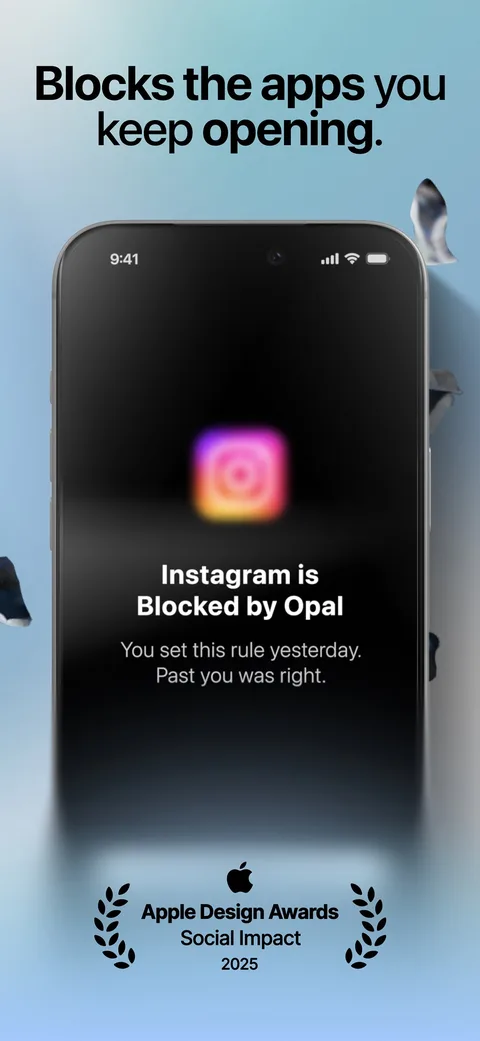
Opal works in rules. A rule picks the apps, games or websites to block and says when: at set times through the week, after a daily time limit, or after a number of opens, as its listing and pricing page describe. Open a blocked app and a block screen appears with "quotes, puns and more." If you need the app, a break lets you "choose the app you want to use, write your intention, and set a timer." Focus sessions block on demand, and since an update on November 4, 2026, a running session shows on the Lock Screen and in the Dynamic Island with a live timer.
Unrotten works in goals. You choose your rot apps, the apps (and, if you want, categories or websites) that eat your time. Apple's Screen Time framework hands them to Unrotten as private tokens, so it never learns their names. Each goal you turn on then decides when Apple's shield locks them:
- Less scrolling: a daily limit; when it's used up, the apps lock until the day resets.
- Shorter scroll sessions: a session length; past it, the apps take a break before they open again.
- Fewer app returns: a daily target for how many times you open them.
- Time away from apps: a daily schedule that blocks them during chosen hours, or allows them only within one window.
- Mornings for yourself, Calmer evenings and Focus on what matters: a protected window each day without them.
A phone-free Work, Focus or Reading session, started from Home's + button, locks the same apps until it ends, with a countdown on the Lock Screen and in the Dynamic Island.
How strict each one gets
Strictness is Opal's strongest suit. Every rule has a difficulty, and the hardest is a wall: "Deep Focus won't let you cancel or bypass at all," says its App Store listing. Its help centre calls that setting "No way, I'm hardcore," keeps it for Opal Pro, and notes that a hardcore session can still be ended early once a week. App Uninstall Protection stops you from deleting Opal or other apps, or changing your phone's date and time, during a blocking session. And with a Screen Time passcode set, which iOS 26.4 allows, Opal "cannot be uninstalled without it," even after a session ends.
Unrotten's shield is firm, but it isn't a vault. The shield screen has no "ignore limit" button, which Apple's own Screen Time limits have: it closes the app, and on iOS 26.5 or later it can open Unrotten. It holds until the limit resets or the window ends, and a limit you raise mid-day only counts from tomorrow. Turning a goal off, or removing Unrotten's Screen Time access, does lift its shield, so it's a commitment device, not a lock nobody can open.
Either way, the research favors deciding in advance. In a 12-week experiment with about 2,000 American Android users, people offered an app that let them set daily limits on their own phones took it up without any incentive: 78% set limits that actually bit and kept them to the end, and their time on social media, browsers and YouTube fell by 22 minutes a day, or 16% [1]. From the same data, the economists estimated that self-control problems account for about 31% of social media use [1].
The best lock isn't the strictest one. It's the one you'll still have switched on in a month.
Sessions, not just days
Most limits count the day, but scrolling runs in sessions: the forty minutes that follow "just checking." Unrotten's Shorter scroll sessions is built for that stretch. Past the length you set, the apps take a break before they open again, so one long scroll becomes several shorter ones, each with a moment to decide. Opal's nearest tool is the break, a timer you set when you choose to go in.
Portions slow people down. In a set of experiments, people went through chocolates more slowly when the same amount came split into smaller portions rather than all together, and the same held for gambling [2]. Each partition was a small decision point, and it mattered most for people who were trying to hold back [2].
What keeps you going: a coach or a score
Opal motivates with numbers. Its Opal Score, its website says, "combines signals from your sleep, focus, and rest into a single measure"; the free plan shows today's score and Pro keeps its history. Milestones you can share and a leaderboard to "challenge friends" turn focus into a game.
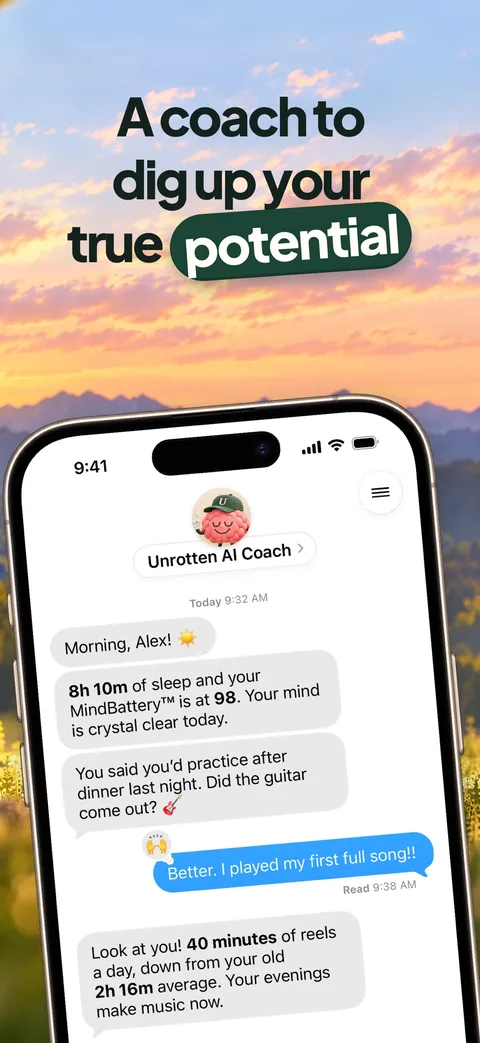
Unrotten motivates with a coach. Unrotten's Coach, a chat drawn like iOS Messages, knows your goals and your day, never the names of your apps. It sends a morning message, checks in on the plans you share and nudges you when your scrolling runs fast. You can choose the Wise Coach, the Stoic Coach or the Drill Sergeant, who can be set to Standard, Hard or Savage, and you can send it voice notes. It's a coach, not a therapist.
Unrotten has a score too. The MindBattery™ runs from 0 to 100, drains while you use your rot apps and recharges with sleep, movement, mindful minutes and time away from them, on your Lock Screen, in the Dynamic Island and in widgets. Each goal is tracked every day, met days build streaks with milestones from 7 to 365 days, and Money reclaimed shows the time you've taken back as money at your own hourly wage.
A score on its own rarely changes much. In experiments on screen time tools, people preferred tracking their use to blocking it, even while rating tracking as less effective at cutting it [3]. And limits only work while they're on: in a randomized trial with 111 students, those who capped their phone use at two hours a day for three weeks slept better and reported more well-being, less stress and fewer depressive symptoms than the control group, small to medium effects, and their screen time climbed back once the cap ended [4]. What keeps you from switching the locks off is the part worth choosing carefully.
Price, devices and privacy
- Price: Unrotten costs $49.99 a year or $9.99 a month, each after a 7-day free trial, with no free tier. Opal's pricing page lists Pro at $99.99 a year with a free week, $19.99 a month with three free days, or $399 once, with up to 50% off for students. Its App Store listing also shows weekly plans at $4.99 and $9.99, so check the paywall. Opal's free plan covers one rule, basic timers, app blocking and today's Opal Score.
- Devices: Unrotten is an iPhone app for iOS 17 or later (iPads can run it, as every iPhone app). Opal needs iOS 18 on the iPhone and also has apps for Mac and Android.
- Privacy: Unrotten gets your chosen apps from Apple as private tokens, so it never learns which apps or sites you picked. Opal's listing says it "works entirely on your phone and personal browsing data never leaves your device," while its privacy label, which developers fill in themselves, lists identifiers among the data that may be used to track you across other companies' apps and websites.
Who should pick which
Opal fits you if:
- you want to try a blocker for free before paying;
- you need a lock you truly can't cancel, for an exam season or a deadline;
- you want the same blocks on a Mac or an Android phone;
- your scrolling follows a schedule you can predict, like work hours.
Unrotten fits you if:
- you lose the most time once you're already in a feed, not at the door;
- you want limits tied to goals you chose, like calmer evenings or better sleep;
- a daily word from a coach is more likely to keep you going than a score;
- your iPhone runs iOS 17, or $99.99 a year is more than you want to pay.
For more options, see our Opal alternatives and our full Opal review. If doomscrolling is the trouble, our guide to apps to stop doomscrolling compares what each one does once you're in.
Give one two weeks

Whichever you pick, set it on the hour you lose most, often the last one before bed, and live with it for two weeks. If you keep switching Opal's blocks off, its hard mode is the part worth paying for. If the locks hold but the pull doesn't fade, that's the gap Unrotten was built for: its goals, Coach and MindBattery™ work on the habit, not only on the door.
Aim to cut back rather than quit. In a German study of 619 smartphone users, using the phone an hour less a day helped at least as much as a week without it on most measures, and its effects held up better over four months [5].
If your phone use comes with low mood, anxiety or sleep trouble that lasts, a doctor or therapist can help.
Questions people ask
What is the difference between Unrotten and Opal?
Both lock the apps you choose through Apple's Screen Time. Opal is built around rules and focus sessions, with a strict Deep Focus mode, a free plan and apps for Mac and Android. Unrotten ties every lock to a goal, such as a daily limit or a break after a long session, and adds an AI Coach and the MindBattery™, a score that drains while you use the apps you chose.
Which is cheaper, Unrotten or Opal?
Unrotten costs $49.99 a year or $9.99 a month, each after a 7-day free trial. On Opal's pricing page in November 2026, Opal Pro cost $99.99 a year with a free week, $19.99 a month with three free days, or $399 once. Opal also has a free plan with one rule; Unrotten has no free tier.
Which is stricter, Unrotten or Opal?
Opal, at its strictest. Its App Store listing says Deep Focus won't let you cancel or bypass at all, and its help centre says a hardcore session can be ended early only once a week. Unrotten's shield has no ignore limit button and holds until the limit resets or the window ends, but turning a goal off lifts it.
Do Unrotten and Opal work on older iPhones?
Unrotten needs iOS 17 or later. Opal needs iOS 18 or later, according to its App Store listing in November 2026.
Do Unrotten or Opal work on Android or Mac?
Opal does: its pricing page lists iOS, Android and Mac. Unrotten is an iPhone app, with no Android, Mac or web version.
References
- Allcott H, Gentzkow M, Song L. "Digital Addiction." American Economic Review. 2022;112(7):2424-2463. doi:10.1257/aer.20210867 ↩
- Cheema A, Soman D. "The Effect of Partitions on Controlling Consumption." Journal of Marketing Research. 2008;45(6):665-675. doi:10.1509/jmkr.45.6.665 ↩
- Zimmermann L. "'Your Screen-Time App Is Keeping Track': Consumers Are Happy to Monitor but Unlikely to Reduce Smartphone Usage." Journal of the Association for Consumer Research. 2021;6(3):377-382. doi:10.1086/714365 ↩
- Pieh C, Humer E, Hoenigl A, Schwab J, Mayerhofer D, Dale R, Haider K. "Smartphone screen time reduction improves mental health: a randomized controlled trial." BMC Medicine. 2025;23(1):107. doi:10.1186/s12916-025-03944-z · Read our plain-English summary ↩
- Brailovskaia J, Delveaux J, John J, Wicker V, Noveski A, Kim S, et al. "Finding the 'sweet spot' of smartphone use: Reduction or abstinence to increase well-being and healthy lifestyle?! An experimental intervention study." Journal of Experimental Psychology: Applied. 2023;29(1):149-161. doi:10.1037/xap0000430 · Read our plain-English summary ↩
Written by
Maren AshbyCOO, Unrotten
Maren Ashby is the COO of Unrotten, the iPhone app that helps people take their attention back from the feed. She writes about the research on phones, sleep and focus, and about the small, practical changes that make a phone easier to put down.