

Blog/App blockers & screen time apps/Comparison
Freedom App Blocker Review: Is Premium Worth $39.99 a Year?
How Freedom blocks apps and websites on your iPhone and your computer, what Locked Mode really locks, what it costs and what to use instead.


In this article
Freedom blocks distracting apps, websites or the whole internet on all your devices at once, in sessions you start now or schedule ahead. On iPhone it locks apps through Apple's Screen Time and filters websites with a VPN that runs on the phone. The free plan covers short sessions you start yourself; Premium, $39.99 a year after a 7-day free trial, adds schedules, longer sessions and Locked Mode. Whether that's worth paying for comes down to where your attention leaks: through one screen, or through all of them.
Disclosure: Unrotten, one of the alternatives below, is made by the team behind this blog. We checked Freedom on November 7, 2026, against its US App Store listing, its website and its help center, and every other app against its own listing and site. We didn't lab-test anything: every price, rating and feature here comes from those pages.
Freedom at a glance
- What it is: an app and website blocker for iPhone, iPad, Mac, Windows and Android, with a Chrome extension for Chromebooks and Linux. It's made by Eighty Percent Solutions Corporation, founded in Chapel Hill, North Carolina, and its iPhone app has been on the App Store since 2018.
- Price: a free plan; Premium at $39.99 a year after a 7-day free trial, or $8.99 a month; Forever, a one-time plan, at $199 on the App Store or $99.50 on Freedom's website in November 2026.
- Needs: iOS 16.1 or later on iPhone.
- Rating: 4.5 stars from about 6,100 US App Store ratings.
- Best for: people whose distractions move between the laptop and the phone.
- Watch out for: on iPhone, Locked Mode doesn't protect the Screen Time permission Freedom runs on; a Screen Time passcode on iOS 26.4 or later does.
How Freedom works on iPhone
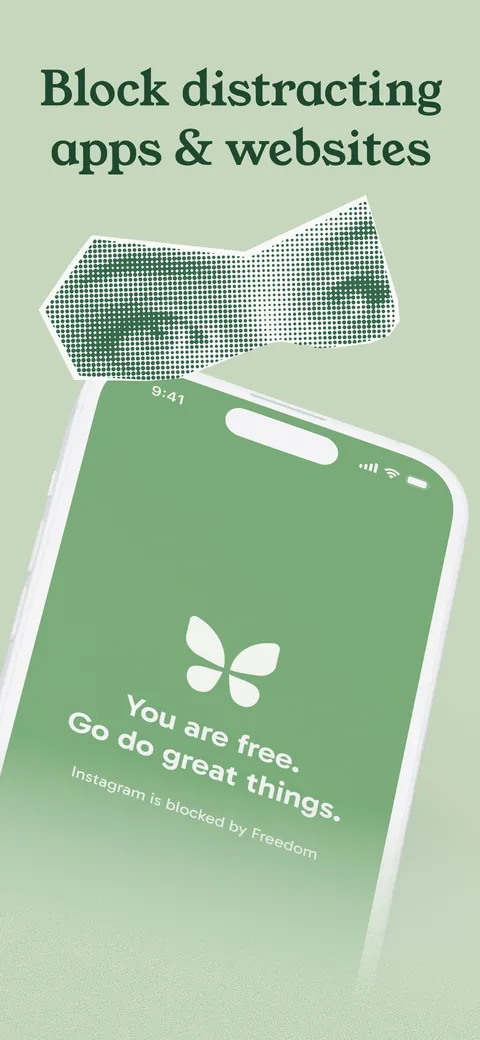
Freedom is built around sessions. You make blocklists of apps, app categories or websites, then start a session that blocks them now (for up to 24 hours), later today or on a recurring schedule.
On iPhone, Freedom's help center says it uses "two separate blocking systems" [1]:
- Apps, through Apple's Screen Time. You pick them in Apple's own app picker, and a blocked app shows Freedom's green screen instead of opening. Because Screen Time runs on the phone, sessions start and stop on time even offline.
- Websites, through the Freedom Profile, a local VPN that filters traffic in every browser and many apps. In Freedom's words, "it never sends your traffic off the phone." It's optional: without it, a Safari content blocker still covers Safari.
A blocklist can also switch off the whole internet on the phone; important texts and calls still come through, its App Store listing says.
The extras are small: focus sounds, a 5-minute break that doesn't end your session, and a block screen you can rewrite. What's missing is deliberate: Freedom says there are "no dopamine-triggering streaks, points, leaderboards, or rewards."
On privacy, Freedom's policy says: "We do not track, store, retain, or transmit your app or website use." Its help center says it uses analytics and marketing tools such as Google Analytics and Facebook, and its App Store privacy label lists identifiers among the data that may be used to track you.
On your laptop, and everywhere else

Freedom's real difference is reach. One session can cover every device on your account, with no limit on how many, on the free plan too, and your blocklists and schedules sync between them. Start one in the morning and it locks the app on your phone and the laptop tab that turns into forty minutes, as long as both are on your list.
- Mac and Windows: websites, desktop apps such as email or games, or the whole internet, plus sessions that allow only the sites you choose.
- Android: apps and websites.
- Chromebook and Linux: websites only, through a Chrome extension.
Locked Mode and Uninstall Protection
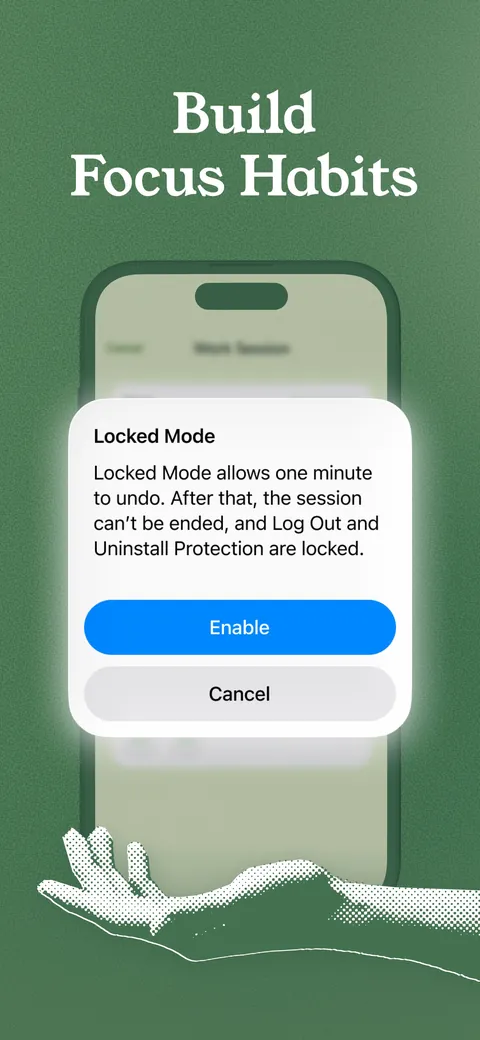
Locked Mode, a Premium feature, turns a session into a commitment. While a session runs on your iPhone, you can't log out of Freedom or take apps and websites off your blocklists, and on Mac and Windows you can't quit the app. You can't delete devices from your account during a session either, and you can end a session early only once every 7 days [2]. That weekly early exit can be switched off or removed for good, and Freedom's support team won't end a session for you.
Uninstall Protection (iOS 16 or later) stops every app on the phone, not just Freedom, from being deleted during a session; with Locked Mode on, it can't be turned off.
There's one gap, and Freedom is open about it: on iPhone, Locked Mode "doesn't stop someone from disabling Freedom's Screen Time permission in the iPhone's Settings app" [2]. Its fix is a Screen Time passcode, ideally set by a friend who keeps it: once set, it's required before Freedom's Screen Time access can be turned off. That needs iOS 26.4 or later; on earlier versions the passcode doesn't lock an individual app's access [3]. The gap isn't unique to Freedom: removing Unrotten's Screen Time access lifts its shields too.
Does blocking actually help?
Blocking mobile internet helped, most of all for those who kept it on. In a preregistered trial, American and Canadian iPhone users got Freedom Premium to block all mobile internet on their phones for two weeks, keeping calls, texts and their computers. Sustained attention, measured with a test rather than a questionnaire, improved, and so did mental health and well-being: small to moderate effects. In the group that blocked first, screen time fell from 314 to 161 minutes a day, then climbed back to 265 two weeks after the block ended. But of the 467 people who committed, 266 set the block up and only 119 kept it on for at least 10 of the 14 days [4].
The hard part of blocking was never the block. It was keeping it switched on.
Checking less often lowers stress. In a two-week experiment, 124 adults spent one week checking email only three times a day, alerts off, and the other checking as often as they could, in random order. In the limited week they checked about five times a day instead of about thirteen, felt less distracted by email and reported less daily stress, a modest effect [5]. Freedom can block an email app and its website, so recurring sessions can keep your inbox closed except for a few windows a day. Our guide on how to focus better has more ways to protect a work block.
Limits you set in advance get used. When economists let people in a randomized experiment set limits on their own future screen time, their use fell substantially, and the researchers' model suggests self-control problems cause about 31% of social media use [6]. Schedules and Locked Mode are that kind of decision, made while you're calm, for the moment you won't be.
What Freedom costs
US prices, checked November 7, 2026:
- Free: apps, websites or the whole internet on unlimited devices, with custom blocklists and focus sounds, in sessions you start yourself of up to two hours.
- Premium: $39.99 a year after a 7-day free trial (shown as $3.33 a month on Freedom's website), or $8.99 a month.
- Forever: one payment for Premium, $199 on the App Store or $99.50 on Freedom's website, marked 50% off.
Premium adds sessions that start later in the day or repeat through the week, sessions longer than two hours, always-on blocks, Locked Mode and discounts on other productivity tools. The App Store also lists other prices ($59.99 a year, $12.99 a month), so check the one the app shows you before you pay.
Where Freedom falls short
- The free plan is a taster. Two-hour sessions you start yourself suit a deadline, but the features that make blocking stick, schedules and Locked Mode, are Premium.
- On iPhone, the firmest lock needs a passcode you don't know, set on iOS 26.4 or later. Without it, the permission under every block is one setting away.
- Website blocking takes your VPN slot. Blocking sites outside Safari needs the Freedom Profile, and iOS generally allows one VPN at a time, so it won't run beside a VPN you already use.
- Its blocks follow the clock. Sessions and schedules decide when apps lock, so catching the phone picked up mid-sentence all day takes a recurring or always-on schedule, which is Premium. For a daily time budget instead, its maker offers a separate free iPhone app, Limit.
Freedom vs the alternatives
| App | Price (US) | How it blocks | Free version | App Store rating (US) |
|---|---|---|---|---|
| Freedom | Free plan; Premium $39.99/yr after a 7-day free trial, $8.99/mo or $199 once | Sessions blocking apps, websites or the whole internet on all your devices | Yes (sessions up to 2 hours) | 4.5 (6.1K ratings) |
| Unrotten | $49.99/yr or $9.99/mo, each after a 7-day free trial | Screen Time shields tied to goals: a daily limit, session breaks, protected hours | No (7-day free trial) | New (October 2026) |
| Opal | Free plan; Pro $99.99/yr, $19.99/mo or $399 once | Screen Time rules: schedules, time limits, open limits; Deep Focus can't be cancelled | Yes (1 rule) | 4.7 (91K ratings) |
| Cold Turkey Blocker | Free; Pro $45 once | Locked blocks of websites and apps, on Windows and Mac only | Yes (website blocks) | No iPhone app |
| ScreenZen | Free; optional tips | A wait before chosen apps open, plus limits and strict blocks | Yes, all features | 4.9 (53K ratings) |
| Apple Screen Time | Free, built in | Limits and schedules in Settings; on iOS 26, limits can be ignored by default | Yes | Built into iOS |
Checked November 7, 2026, on the US App Store and each maker's website.
Unrotten: best for changing an iPhone habit, not just blocking it
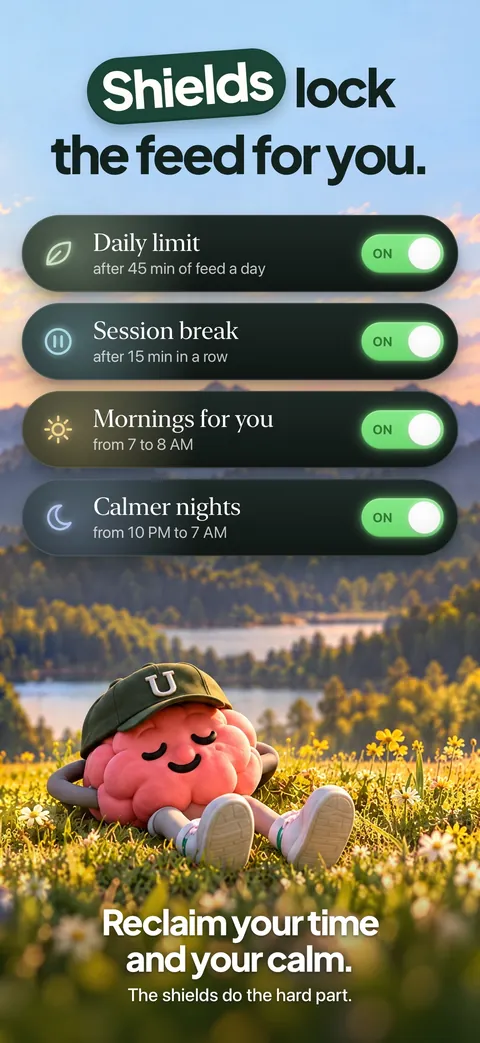
Unrotten works the other way round. Instead of sessions you start, it sets rules for the apps that eat your time, and they hold on their own. You choose your rot apps and turn on goals: Less scrolling gives them a daily limit, Shorter scroll sessions makes them take a break after a session length you set, and Mornings for yourself or Calmer evenings protect a window each day. The shield has no "ignore limit" button and holds until the limit resets or the window ends, and a limit you raise mid-day only counts from the next day.
For focused work, a phone-free Work, Focus or Reading session from Home's + button locks your rot apps until it ends, with a countdown on the Lock Screen and in the Dynamic Island. An AI Coach sends a morning message, checks in on the plans you share and nudges you when the scrolling runs fast, and a MindBattery™ score drains with your rot apps and recharges with sleep, movement and time away.
Watch out for: it's an iPhone app (iOS 17 or later), with no Mac, Windows, Android or web version. There's no free tier, only a 7-day free trial, and it's new, on the App Store since October 14, 2026. It's also a commitment device, not a vault: turning a goal off, or removing Unrotten's Screen Time access, lifts that goal's shield.
Opal: best for strict blocking with a free plan
Opal also blocks apps and websites through Apple's Screen Time, on schedules, after time limits or after a number of opens. Its listing says Deep Focus "won't let you cancel or bypass at all," and its pricing page sums up Pro's Hard Mode as "No way out." The free plan includes one rule; Pro is $99.99 a year, $19.99 a month or $399 once. It needs iOS 18 and also runs on Android and Mac. Our Opal review has the details.
Cold Turkey Blocker: best for locked-down blocking on a computer
If the laptop is the real problem, Cold Turkey Blocker says it makes it "almost impossible to stop the block once you lock it." It runs on Windows and macOS only; mobile devices aren't supported. The free version blocks websites on a timer, and Pro, $45 once for all the computers you use, adds app blocking, schedules and its locking features.
ScreenZen: best free option that covers your computer too
ScreenZen is completely free, supported by optional tips, and runs on iPhone, Mac, Windows and Android. It makes you wait before a chosen app opens, and adds strict blocks and a lock on its own settings. Our guide to social media blocker apps compares it with seven others.
Apple Screen Time: the free first step
Every iPhone can limit apps and schedule time away in Settings, then Screen Time, for free. On iOS 26, Apple's guide notes that "by default, Screen Time limits can be ignored once reached," and blocking apps during Downtime takes a Screen Time passcode [7]. On iOS 27, it describes Time Allowances, for how long you can use a category of apps each day, and Schedules, for when [8].
Who should pay for Freedom
Freedom earns its $39.99 a year if your distractions ignore device borders: the news site on the laptop, the feed on the phone, the tablet on the couch. It locks all of them with one session, and the free plan lets you test that first. Upgrade once you catch yourself starting the same session every morning, since that's what schedules and Locked Mode are for, and on iPhone, add a Screen Time passcode someone else keeps.
Look elsewhere if the trouble lives almost entirely on your phone, in bursts all day. Freedom's blocks follow the clock; Unrotten's daily limit and session breaks follow your use, locking the feed once you've had your share, with a Coach in your corner while the shields hold.
Whichever you choose, start with the hour that costs you most, and judge it after two weeks, not two days.
Questions people ask
How does Freedom block apps on iPhone?
Freedom blocks apps with Apple's Screen Time: during a session, a blocked app shows Freedom's green screen instead of opening. For websites it uses the Freedom Profile, a local VPN that filters traffic in every browser and, Freedom says, never sends it off the phone. The iPhone app needs iOS 16.1 or later.
Is Freedom free?
Freedom has a free plan that blocks apps, websites or the whole internet on unlimited devices, in sessions you start yourself of up to two hours. Premium adds scheduled and recurring sessions, longer sessions and Locked Mode for $39.99 a year after a 7-day free trial, or $8.99 a month (US prices, November 2026).
What does Freedom's Locked Mode do?
Locked Mode, a Premium feature, stops you from logging out or removing apps and sites from a blocklist while a session runs, and lets you end a session early only once every 7 days, an option you can switch off. On iPhone, Freedom's help center notes it doesn't stop someone from turning off Freedom's Screen Time permission in Settings; a Screen Time passcode on iOS 26.4 or later closes that gap.
Does Freedom work on Mac and Windows?
Yes. Freedom runs on Mac, Windows, iPhone, iPad and Android, and a Chrome extension blocks websites on Chromebooks and Linux. One session can block distractions on all your devices at once, with no limit on how many. On Mac and Windows it can also block desktop apps or allow only the websites you choose.
What is the best alternative to Freedom?
It depends on where you lose time. For an iPhone habit, with limits tied to goals and a coach, Unrotten. For strict blocking with a free plan, Opal. For locked-down blocking on a Windows or Mac computer, Cold Turkey. For free, ScreenZen or Apple's Screen Time.
References
- Freedom. "How Freedom Blocks Apps and Websites on iOS." Freedom Help Center. Accessed November 7, 2026. support.freedom.to ↩
- Freedom. "Locked Mode." Freedom Help Center. Accessed November 7, 2026. support.freedom.to ↩
- Freedom. "How to prevent disabling Freedom's Screen Time permissions on iOS." Freedom Help Center. Accessed November 7, 2026. support.freedom.to ↩
- Castelo N, Kushlev K, Ward AF, Esterman M, Reiner PB. "Blocking mobile internet on smartphones improves sustained attention, mental health, and subjective well-being." PNAS Nexus. 2025;4(2):pgaf017. doi:10.1093/pnasnexus/pgaf017 · Read our plain-English summary ↩
- Kushlev K, Dunn EW. "Checking email less frequently reduces stress." Computers in Human Behavior. 2015;43:220-228. doi:10.1016/j.chb.2014.11.005 · Read our plain-English summary ↩
- Allcott H, Gentzkow M, Song L. "Digital Addiction." American Economic Review. 2022;112(7):2424-2463. doi:10.1257/aer.20210867 ↩
- Apple. "Set schedules with Screen Time on iPhone." iPhone User Guide, iOS 26. Accessed November 7, 2026. support.apple.com ↩
- Apple. "Set Screen Time Schedules and Time Allowances in Screen Time on iPhone." iPhone User Guide, iOS 27. Accessed November 7, 2026. support.apple.com ↩
Written by
Maren AshbyCOO, Unrotten
Maren Ashby is the COO of Unrotten, the iPhone app that helps people take their attention back from the feed. She writes about the research on phones, sleep and focus, and about the small, practical changes that make a phone easier to put down.