

Blog/Comparison
BlockSite Review: Does It Work on iPhone?
What BlockSite blocks on your iPhone and in your browser, what it costs, how firm its blocks are, and which alternatives fit better.


In this article
BlockSite blocks websites in your browser and apps and websites on your phone. On iPhone it works from a block list, a schedule or a usage limit, free to start, with password protection and keyword blocking in its paid plan. Whether it's the right blocker for you depends on what pulls you in: a handful of websites, or the apps you open without thinking.
Disclosure: Unrotten, one of the alternatives below, is made by the team behind this blog. We checked BlockSite on October 28, 2026, against its US App Store listing and its official website, and every other app against its own listing and site. We didn't lab-test anything: every price, rating and feature here comes from those pages.
BlockSite at a glance
- What it is: a website and app blocker by BlockSite LP, with browser extensions for Chrome, Safari and Edge and apps for iPhone and Android. The iPhone app has been on the App Store since 2019.
- Price: free to download; Premium plans on the App Store from $3.99 a month, or $23.99 to $47.90 a year.
- Needs: iOS 17.6 or later on iPhone.
- Rating: 4.2 stars from about 6,200 US App Store ratings.
- Best for: people whose time sinks are websites as much as apps, on a laptop as well as a phone.
- Watch out for: password protection, the feature that keeps you from undoing your own blocks, is Premium.
What BlockSite does on iPhone
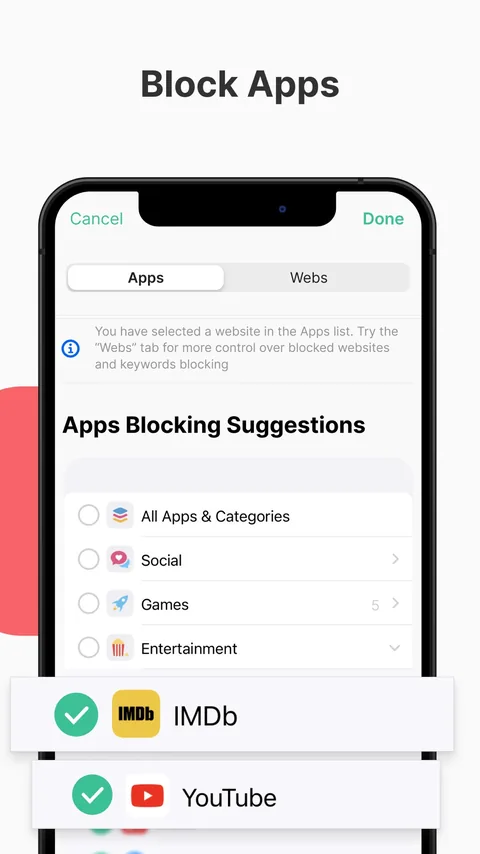
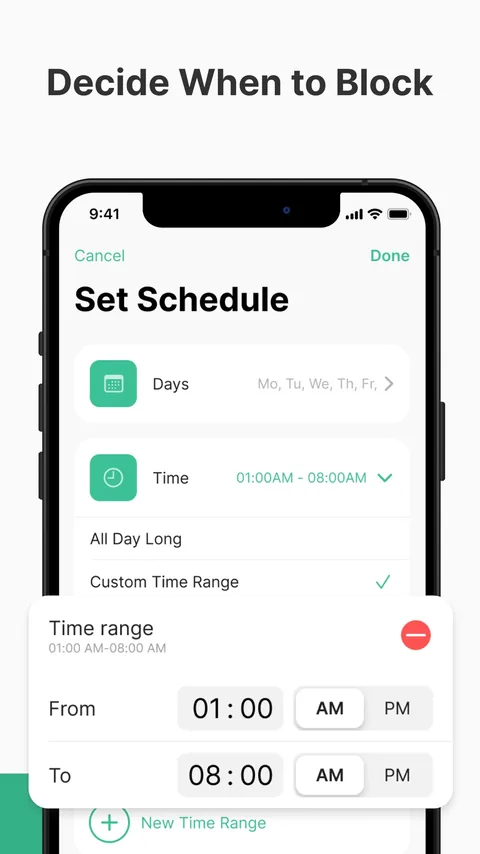
The iPhone app is called BlockSite: Block Apps & Focus. You build a block list of apps and websites, and BlockSite keeps you out of them while the block is on. Its App Store listing names five favorite features: a website blocker, app blocking, a block list, Schedule Mode and a usage limit. In its words, you can add as many websites as you want to your block list and block any app "for however long you want," and Schedule Mode sets the exact days and times when sites and apps are blocked or allowed. Website blocks, it says, work in Safari, Chrome and Firefox.
Premium adds three more. Block by Keyword blocks any website whose address contains a word: block "social," in the listing's example, and every site with it in the URL is out. Unlimited Category Blocking covers groups such as Social Media, Shopping and Entertainment in one tap. Password Protection puts your settings and blocked pages behind a password, "so you aren't tempted to break your focus."
How it does this matters. Apps are blocked through Apple's Screen Time framework, as with other iPhone blockers (the app picker in its screenshots is Apple's own Screen Time list). For websites, the listing says BlockSite uses "inner VPN services" to block them in Safari, Chrome or Firefox. If you already use a VPN, check that the two get along before you rely on it.
BlockSite in your browser
BlockSite also lives in your browser. Its website lists extensions for Chrome, Safari and Edge, and features that go beyond the iPhone listing: a Focus Mode that blocks all distractions for a set time, insights into your browsing, sync that blocks the same sites and apps on all your devices, redirects to another site when you're tempted, a custom block page, uninstall prevention and a Slack integration. If your laptop is where the afternoon disappears, that reach is BlockSite's strongest argument.
What BlockSite costs
The listing promises you can "block websites and block apps today, completely free." For Premium, the US App Store showed these in-app purchases on October 28, 2026:
- Monthly: $3.99, $9.99, $10.99 and $14.99.
- Yearly: $23.99, $38.99 and $47.90.
- BlockSite Premium: $19.99.
BlockSite's website offers a risk-free 30-day guarantee. With so many prices listed, check the one the app shows you before you subscribe.
Does blocking distractions help?
Blocking isn't the only way to protect your attention, but the research on interruptions makes a good case for it:
A buzz is enough to break focus. In a lab experiment, phone notifications that people didn't even answer worsened their performance on an attention-demanding task, by about as much as actually using a phone for calls or texts does [1].
Fewer interruptions, not zero. In a two-week field experiment with 237 people, those whose notifications arrived in three batches a day felt more attentive, more productive, in a better mood and more in control of their phones than people with notifications as usual. People who got no notifications at all reaped few of those benefits and felt more anxiety and fear of missing out [2].

Blocking works, if you keep it on. In a randomized trial, adults installed Freedom, a blocking app, to switch off all mobile internet on their iPhones for two weeks. It improved their sustained attention, mental health and well-being, and their screen time fell from 314 to 161 minutes a day. But of the 467 who committed, only 119 kept the block on for at least 10 of the 14 days, and screen time climbed back to 265 minutes once it ended [3].
A blocker you'll keep on beats a stricter one you'll switch off.
Limits you set ahead of time get used. In a large randomized experiment, giving people a way to set limits on their own future screen time substantially reduced their use, and the economists behind it estimated that self-control problems cause about 31% of social media use [4].
Where BlockSite may not suit you
- If you'd undo your own blocks. The free version blocks, but password protection, the guard against your own late-night bargaining, is Premium.
- If you want help with the habit, not just a wall. BlockSite's listing is about blocking: lists, schedules, limits, categories and keywords. If what eats your evening is a feed you open fifty times a day, you may want goals and a reason to stop as well.
- If ratings matter to you. Its 4.2 stars from about 6,200 US ratings trail Freedom's 4.4 and Opal's 4.7.
Before you rely on any blocker, try to get around it once on purpose. You'll learn how much it actually asks of you on a tired night.
BlockSite vs the alternatives
| App | Price (US) | How it blocks | Free version | App Store rating (US) |
|---|---|---|---|---|
| BlockSite | Free; Premium from $3.99/mo, or $23.99 to $47.90/yr | Apps through Screen Time; websites through a VPN; lists, schedules, usage limits | Yes | 4.2 (6.2K ratings) |
| Unrotten | $69.99/yr after a 7-day free trial, or $14.99/mo | Screen Time shields tied to goals, for the apps and websites you choose | No (7-day free trial) | New (October 2026) |
| Freedom | Free plan; Premium $39.99/yr or $8.99/mo | Sessions that block apps, sites or the whole internet on all your devices | Yes | 4.4 (6.1K ratings) |
| Opal | Free plan; Pro $99.99/yr, $19.99/mo or $399 once | Screen Time blocks for apps and websites, limits and schedules; Deep Focus can't be cancelled | Yes (1 rule) | 4.7 (90K ratings) |
| Apple Screen Time | Free, built in | App limits and Downtime; a Never Allow list for websites | Yes | Built into iOS |
Checked October 28, 2026, on the US App Store and each maker's website.
Unrotten: best when the apps are the problem
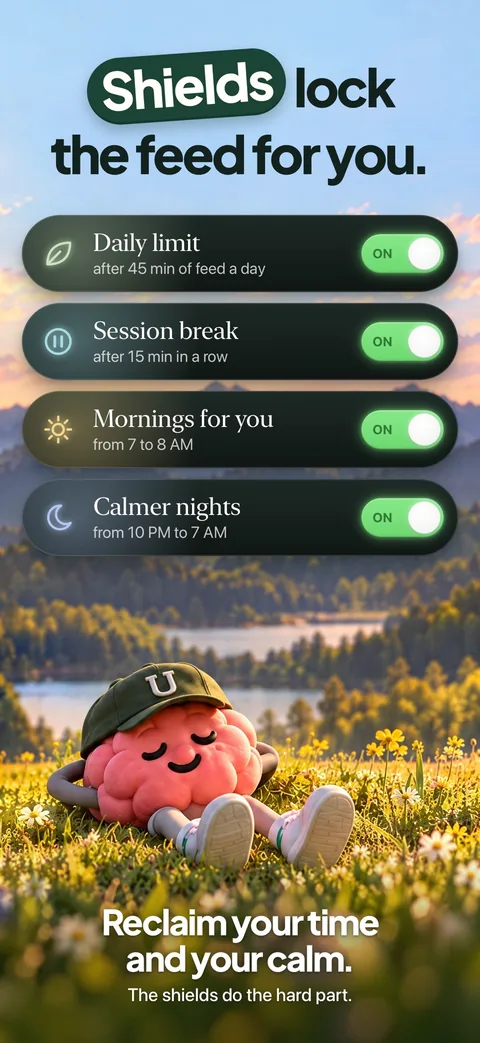
Unrotten starts from the apps that eat your time. You choose your rot apps (and, if you like, app categories or websites) and turn on goals: Less scrolling gives them a daily limit, Shorter scroll sessions makes them take a break after a session length you set, and Time away from apps blocks them during the hours you choose. The shield that locks them has no "ignore limit" button and holds until the limit resets or the window ends.
What it adds is the reason to keep going: an AI Coach that sends a morning message, checks in on the plans you share and nudges you when the scrolling runs fast, and a MindBattery score on your Lock Screen and in the Dynamic Island that drains with your rot apps and recharges with sleep, movement and time away.
Watch out for: it's an iPhone app, with no Android, Mac, Windows or browser version, so it won't block anything on your laptop. There's no free tier, only a 7-day free trial on the yearly plan. And it's a commitment device, not a vault: turning a goal off, or removing its Screen Time access, lifts that goal's shield.
Freedom: best for blocking on every device
Freedom's free plan already blocks apps, websites or the whole internet and syncs a blocking session across your devices, with no limit on how many: Mac, Windows, iPhone, Android and Chromebook. Premium is $39.99 a year or $8.99 a month after a 7-day free trial, and adds Locked Mode, which "prevents quitting so you stay committed." It's the app the researchers used in the mobile internet trial above.
Opal: best for strict blocking on iPhone, Android and Mac
Opal blocks apps and websites on schedules, after time limits or after a number of opens, and its listing says Deep Focus "won't let you cancel or bypass at all." The free plan includes one rule; Pro is $99.99 a year, $19.99 a month or $399 once. It needs iOS 18 on iPhone and also runs on Android and Mac. Our guide to the best app blockers for iPhone compares it with nine others.
Apple Screen Time: free, and it blocks websites too
Your iPhone can block websites without any app. On iOS 26, Apple's guide lists the steps: open Settings, tap Screen Time, then Content & Privacy Restrictions and turn it on; tap App Store, Media, Web, & Games, then Web Content; select Limit Adult Websites and add each site under Never Allow [5]. App limits and Downtime cover the apps, but by default, Apple notes, "Screen Time limits can be ignored once reached" [6]. Our guide to locking apps on iPhone walks through both.
Who BlockSite is for
BlockSite makes the most sense if your distractions live in a browser, on your laptop and your phone alike, and you'd like one tool for both. Start with the free version, block your three worst sites on a schedule, and pay for Premium only if you catch yourself undoing the blocks.
If your problem is less the websites than the apps on your iPhone, the feed you reach for in every pause, a phone-first tool fits better. That's what Unrotten's daily limit and session breaks are for.
Questions people ask
Does BlockSite work on iPhone?
Yes. The iPhone app, BlockSite: Block Apps & Focus, needs iOS 17.6 or later. It blocks apps and websites on a block list, on a schedule or after a usage limit, and its listing says website blocks work in Safari, Chrome and Firefox, using what it calls inner VPN services.
Is BlockSite free?
BlockSite is free to download, and its App Store listing says you can block websites and apps for free. Block by Keyword, unlimited category blocking and password protection are Premium. On October 28, 2026, the US App Store listed Premium plans from $3.99 to $14.99 a month and $23.99 to $47.90 a year.
How do I block a website on my iPhone without an app?
Apple's guide for iOS 26 lists the steps: open Settings, tap Screen Time, then Content & Privacy Restrictions and turn it on. Tap App Store, Media, Web, & Games, then Web Content, select Limit Adult Websites, and add the site under Never Allow.
What is the best alternative to BlockSite?
For blocking on every device, Windows and Chromebook included, Freedom. For strict app and website blocking with a free plan on iPhone, Android and Mac, Opal. For limits on your iPhone's apps tied to goals and a coach, Unrotten. For a free option, Apple's Screen Time.
References
- Stothart C, Mitchum A, Yehnert C. "The attentional cost of receiving a cell phone notification." Journal of Experimental Psychology: Human Perception and Performance. 2015;41(4):893-897. doi:10.1037/xhp0000100 ↩
- Fitz N, Kushlev K, Jagannathan R, Lewis T, Paliwal D, Ariely D. "Batching smartphone notifications can improve well-being." Computers in Human Behavior. 2019;101:84-94. doi:10.1016/j.chb.2019.07.016 ↩
- Castelo N, Kushlev K, Ward AF, Esterman M, Reiner PB. "Blocking mobile internet on smartphones improves sustained attention, mental health, and subjective well-being." PNAS Nexus. 2025;4(2):pgaf017. doi:10.1093/pnasnexus/pgaf017 ↩
- Allcott H, Gentzkow M, Song L. "Digital Addiction." American Economic Review. 2022;112(7):2424-2463. doi:10.1257/aer.20210867 ↩
- Apple. "Block apps, app downloads, websites, and purchases on iPhone." iPhone User Guide, iOS 26. Accessed October 28, 2026. support.apple.com ↩
- Apple. "Set schedules with Screen Time on iPhone." iPhone User Guide, iOS 26. Accessed October 28, 2026. support.apple.com ↩
Written by
Maren AshbyCOO, Unrotten
Maren Ashby is the COO of Unrotten, the iPhone app that helps people take their attention back from the feed. She writes about the research on phones, sleep and focus, and about the small, practical changes that make a phone easier to put down.