
Blog/Digital minimalism/Roundup
The Best Dumb Phone Apps for iPhone in 2026, and Which Ones Lock
Seven apps that turn your Home Screen into a plain list of words, plus Apple's free settings, compared on price, ratings and what each one actually stops.

In this article
You don't have to give up your iPhone to get a dumber one. A dumb phone app keeps what you rely on (maps, the code your bank texts you, the group chat) and swaps the wall of colorful icons for a short list of plain words. Some of these apps stop at the look. Others also lock the apps you just hid, and that difference matters more than the font.
Disclosure: Unrotten, one of the apps below, is made by the team behind this blog. We checked every other app on November 26, 2026, against its US App Store listing, website and help center, and Apple's tools against its iPhone User Guide for iOS 27 and iOS 26. We haven't lab-tested any of them: every price, rating and feature here comes from those pages.
The quick comparison
| App | Price (US, November 2026) | What it changes | Locks apps? | US rating |
|---|---|---|---|---|
| Unrotten | $49.99 a year or $9.99 a month, 7 days free | Not the Home Screen: it limits the apps you choose | Yes, with Apple's Screen Time shield | New in 2026 |
| Blank Spaces | Subscription required; plans listed from $1.99 to $29.99 | Your apps as a list of words in widgets | Yes, through Screen Time, with a challenge to unlock | 4.6 (8,804 ratings) |
| Dumb Phone (dp) | Free to try; Pro listed from $2.99 to $49.99 | Text launchers you can switch between | Yes, its Detox Mode, through Screen Time | 4.6 (3,957) |
| minimalist phone | 7 days free, then plans listed from $4.99 to $59.99 | Text Home Screen pages | Yes, for 4 hours to 30 days, or on a schedule | 4.6 (893) |
| Minimalist Launcher | Premium listed from $5.99 to $44.99 | A minimal Home Screen | Its listing says so; how isn't documented | 4.7 (3,682) |
| White Screen | Free; $9.99 once for Premium | Your apps as a list of words in widgets | No | 4.6 (200) |
| Dumb Phone: Launcher & Themes | Free; Pro listed from $1.99 a week to $79.99 for life | Themes and widgets | Yes, per its listing | 4.2 (229) |
| Your iPhone's settings | Free | Hidden pages, App Library, search, grayscale | Screen Time limits | Built in |
Ratings are from the US App Store on November 26, 2026. Most listings show several old and new prices for the same plan, so the price the app shows you is the one that counts.
What a dumb phone app can and can't do on an iPhone
An iPhone doesn't let another app take over its Home Screen. So the launchers here work in much the same way: you choose your essential apps inside the app, it shows them as plain text, usually in a widget, and you place that on a Home Screen page yourself. Dumb Phone's help center says "non-system apps like Dumb Phone aren't allowed to automatically adjust the Home Screen," and Blank Spaces warns that setting things up inside the app "doesn't change your Home Screen by itself."
You hide the rest with Apple's tools. Removing an app from the Home Screen doesn't delete it: it moves to the App Library and can still be used from there [1]. The App Library is always available, past your last page, with a search field at the top [2]. Neither Blank Spaces nor Dumb Phone can hide it; both suggest filling the pages in between with empty widgets, so it sits a few swipes away instead of one.
A launcher changes what you see when you unlock the phone. It doesn't change what you can open.
That's why the bigger apps here do two jobs. The list of words is the look. The lock is a separate feature that runs on Apple's Screen Time, where Apple's own guide sends you "to block an app to prevent its use" [1]. If the feed is one search away and nothing stops it, a plain Home Screen may only slow you down until your thumb learns the new route.
What the research says about a boring phone
No published study has tested a minimalist launcher on its own, so be wary of any app that promises you a number. The closest evidence comes from the pieces these apps combine.
In a trial at McGill University, people picked from ten changes, including hiding social media and email apps in a folder off the Home Screen, turning off notifications and switching to grayscale. In the second study, with 70 young adults, daily screen time fell by 57 minutes in the group that made the changes, against 11 minutes in a group that only tracked it, and problematic phone use and sleep quality improved compared with that group [3]. It counted only people who followed at least five of the ten, and since everyone chose their own mix, it can't say which change did the work. In the first study, though, 90% of participants reported following the change that hid social apps off the Home Screen two weeks in, against 38% for grayscale [3].
Grayscale has its own small study: of 161 college students, the 73 who went gray for 8 to 10 days cut their total screen time by about 38 minutes a day, with less time on social media and browsing [4]. And redesigning the feed may help more than counting it: in a four-week test of a Twitter app with 31 people, features that changed the feed raised their sense of agency, while a usage dashboard and nudges to close the app didn't [5].
The strongest evidence is for friction and locks. In a six-week study of one sec, an app that makes you pause before a chosen app opens, 280 people closed the app again on 36% of their attempts, and by the sixth week they opened those apps 57% less often [6]. In a randomized trial where people agreed to block all mobile internet for two weeks, keeping calls and texts, mental health, well-being and sustained attention improved, yet only about a quarter of the 467 who agreed kept the block on for at least 10 of the 14 days [7].
The look is easy to keep. The lock has the stronger evidence, and it's the part people struggle to leave on.
The 8 best dumb phone apps for iPhone
1. Unrotten: best if the feed needs a lock, not a new look
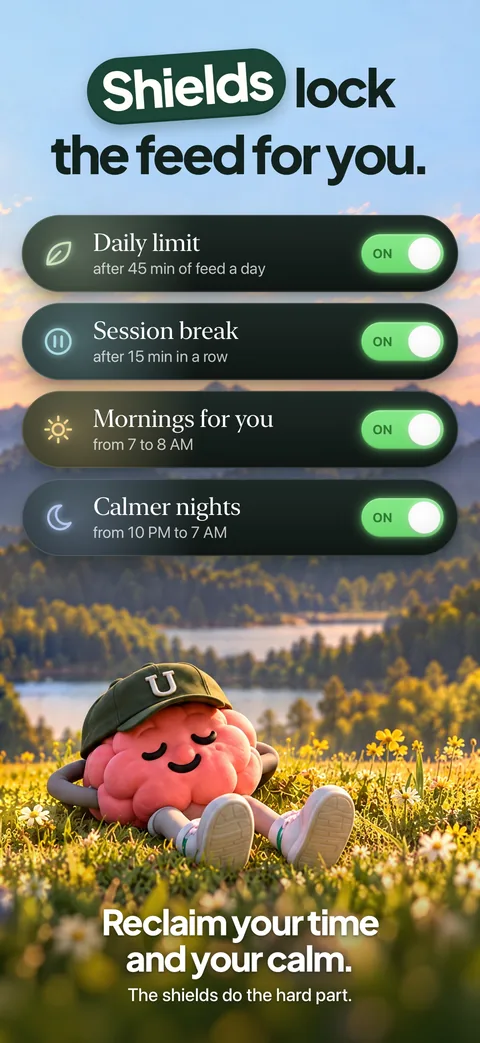
Unrotten isn't a launcher and doesn't restyle your Home Screen. It does the half with the stronger evidence: you choose the apps that eat your time, and it locks them with Apple's Screen Time shield. A daily limit in Unrotten locks them until the day resets once it's used up, a session break makes them wait after a long scroll, and windows such as Mornings for yourself keep them shut during the hours you pick. Everything else keeps working. The shield has no "ignore limit" button, though turning a goal off lifts it: a commitment device, not a lock nobody can open. Unrotten's Coach checks in on the plans you share and nudges you when scrolling runs fast.
- Best for: people whose trouble is three or four feed apps, not the whole phone.
- Watch out for: it needs a membership ($49.99 a year or $9.99 a month, each with a 7-day free trial) and iOS 17 or later. For the plain look too, add Apple's settings (number 8) or a launcher.
2. Blank Spaces: best all-in-one launcher
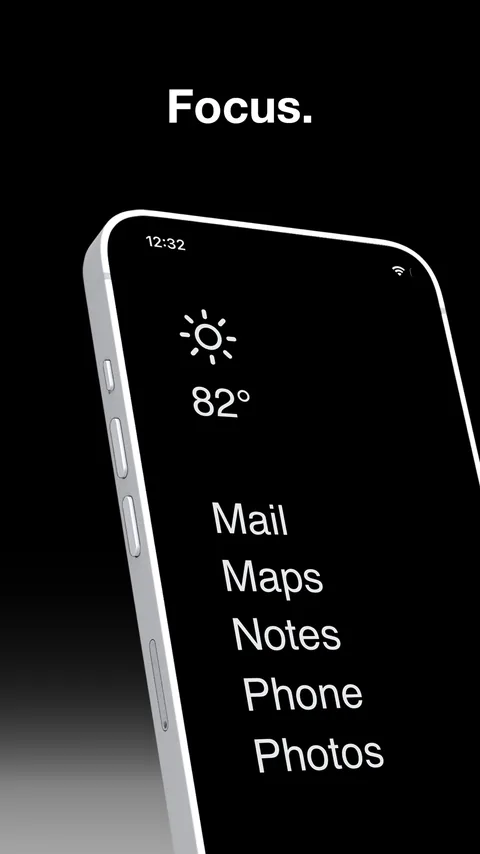
Blank Spaces has the most ratings of any app on this list and a detailed help center. Its widgets turn the Home Screen into a short list of words (one full-page widget on iOS 27, two on iOS 26 and 18). Its locks run through Screen Time, all day, on a schedule or after a daily budget of minutes, for up to 50 apps. To open a locked app you pass a challenge you choose: breathing, a code, push-ups counted by the front camera or pointing the camera at grass outside. Then you pick how long the app stays open, from 2 to 30 minutes.
- Best for: the look and a lock in one app, with some friction on the way in.
- Watch out for: the App Store lists it as free, but its help center says "There's no free trial or free version." It needs iOS 18 or later.
3. Dumb Phone (dp): best for different setups through the day
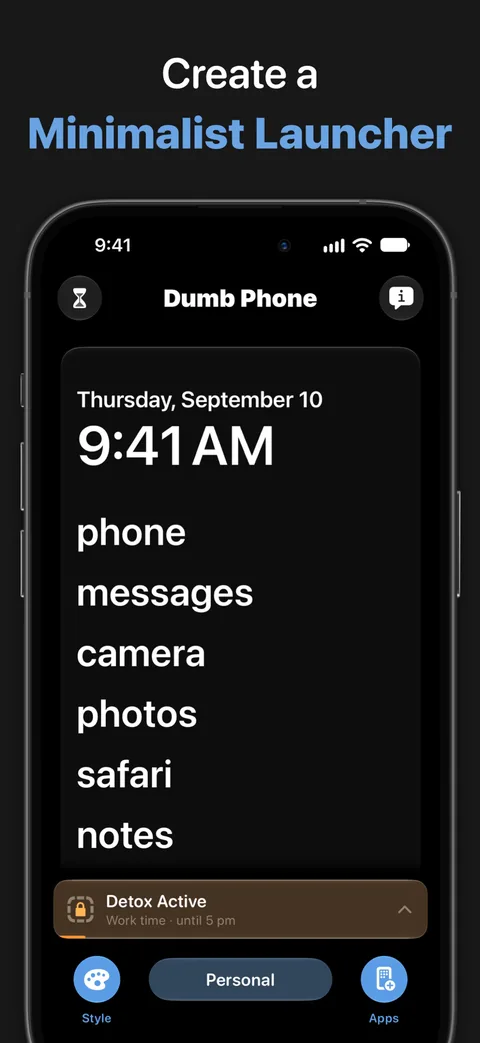
Dumb Phone (dp), from Tigas Industries, lets you build several launchers (work, leisure, night) and switch between them from Control Center. Its Detox Mode blocks or hides the apps you don't need "with the powerful capabilities of Screen Time," and through Apple's Focus Filters it can turn on with a Focus. Its help center is frank about limits: iOS blocks at most 50 apps chosen in the Screen Time picker.
- Best for: days with distinct modes, and a phone that changes with them.
- Watch out for: its website says "Free to try" without saying which features are free. It's a different app from number 7, by a different developer.
4. minimalist phone: best for long, hard blocks
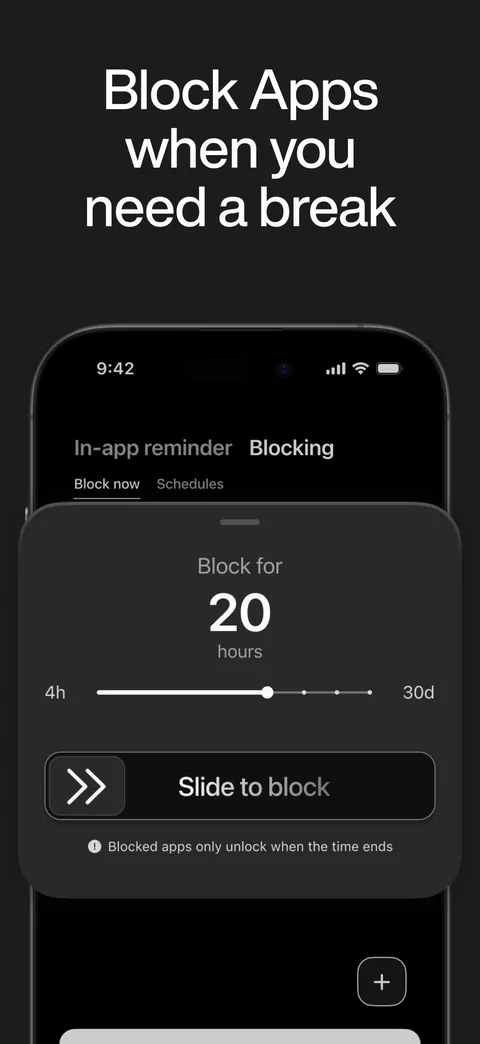
The app called minimalist phone (its maker writes it in lowercase) pairs text Home Screen pages with blocks measured in hours and days: its App Blocker locks an app "for a chosen duration ranging from 4 hours to 30 days," with its notifications blocked too. It also blocks websites, runs schedules and adds a 15-second delay before social media apps open.
- Best for: keeping the phone boring for days, not minutes.
- Watch out for: it's the only app on this list whose App Store privacy label includes "Data Used to Track You" (purchases, browsing history, identifiers and other data).
5. Minimalist Launcher: best for a plain list with a detox schedule
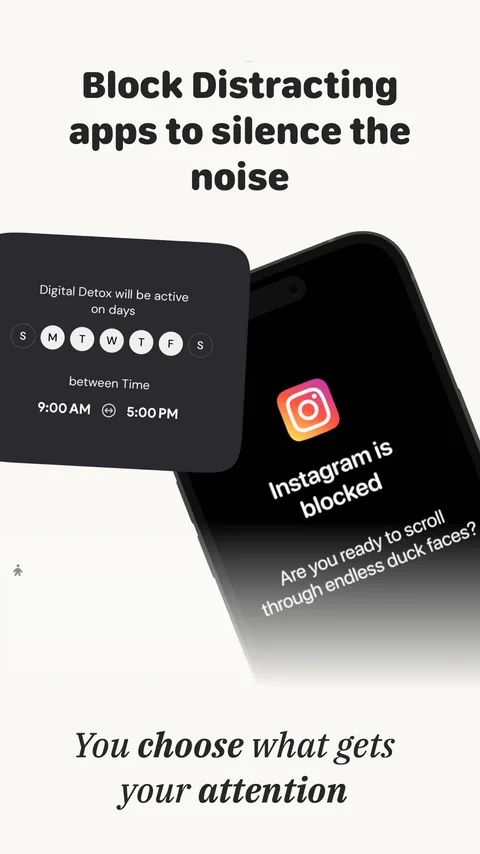
Minimalist Launcher, by the developer Ankit Kumar, is rated 4.7 from 3,682 ratings. Its listing promises "a Minimal Home Launcher to simplify your iOS home screen" plus "Digital Detox and App Blocking," and its screenshots show a detox schedule set by days and hours.
- Best for: a clean list and a simple schedule, if you don't mind setting it up without a manual.
- Watch out for: there's no help center, only a support email, so how its blocking works isn't documented. Its listing says "We do not collect any data from user," yet its privacy label lists purchases, identifiers, usage data and diagnostics as collected, though not linked to you. Last updated in July 2026.
6. White Screen: best for paying once
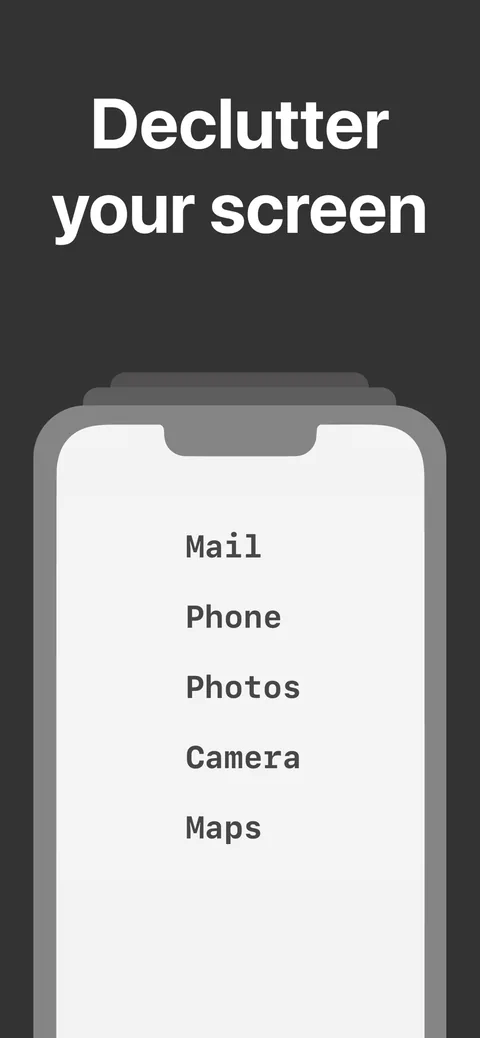
White Screen only does the look: your apps in text widgets, with wallpapers that blend into them. One $9.99 Premium purchase unlocks "unlimited apps per widget, custom backgrounds, and shortcuts," and its privacy label says no data is collected.
- Best for: the look alone, paid for once.
- Watch out for: nothing stops you opening a hidden app from the App Library or search. It needs iOS 18 or later, and its last update was in December 2025.
7. Dumb Phone: Launcher & Themes: best for themes
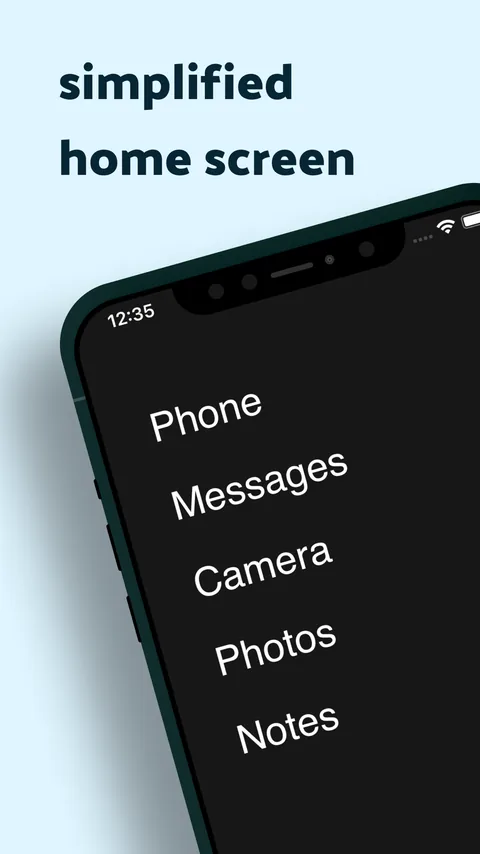
This second Dumb Phone, from Yevhen Tretiakov, puts the look first: a calm layout with optional widgets for the date, weather or Apple Health. Its listing adds blocks for a set time, scheduled focus periods, limits on how often an app opens and a pause before one unlocks, and its website says Pro brings "unlimited themes, advanced widget customization, and Rules to reduce distractions."
- Best for: people who care about the look first and want a few rules on top.
- Watch out for: the lowest rating here, and a privacy policy that says analytics are on by default with no setting to turn them off (it leaves out app names and Screen Time selections).
8. Your iPhone's own settings: the free version
Much of the look costs nothing: remove the feed apps from the Home Screen, hide the extra pages and turn the screen gray, as below. Apple's Assistive Access goes further, swapping the whole interface for a simpler one with bigger onscreen items, though Apple designed it for people with cognitive disabilities [8]; our step-by-step guide to dumbing down an iPhone covers what it allows.
- Best for: trying the idea for a week before paying for anything.
- Watch out for: Screen Time's own limits are the only lock here; our guide to locking apps on iPhone explains them for iOS 27 and iOS 26.
How to set it up so it sticks
Whichever app you choose, most of the setup is Apple's.
- Decide what stays: calls, Messages, Maps, the camera, your bank, your authenticator. Anything with a feed goes.
- Remove the rest from the Home Screen: touch and hold an app, tap Remove App, then Remove from Home Screen [1].
- Hide the extra pages: touch and hold the wallpaper, tap the dots at the bottom and tap the checkmarks under the pages to hide. In Settings, Home Screen & App Library, choose App Library Only so new downloads stay off the Home Screen [2].
- Take the feed out of search: in Settings, tap Search, then an app, and turn off Show App in Search [9]. An app you downloaded can also be hidden behind Face ID, which takes it out of search and puts it in a Hidden folder that needs authentication; built-in apps can't be hidden [10].
- Add the launcher's widget to the page that's left, with empty widgets on the pages between it and the App Library.
- Turn the screen gray if color pulls you in; our grayscale guide has the steps.
- Lock what you'd reopen anyway, with the app's own lock, Screen Time or a goal in Unrotten, whose shield holds until its limit resets or its window ends.
Which one should you choose?
- Only the plain look: White Screen for one payment, or Apple's settings for free.
- The look and a lock in one app: Blank Spaces, or Dumb Phone (dp) if your day has distinct modes.
- Blocks that last days: minimalist phone, if its tracking label doesn't bother you.
- A few feed apps are the trouble: Unrotten's session break and daily limit, with or without a launcher on top.
- You'd rather leave the smartphone at home: see our list of the best dumb phones.

Start with the free half tonight
Hide the pages, turn off search for the apps that hook you and live with it for a few days. If your thumb keeps finding its way back, that's your answer: you need a lock, not a nicer list. Pick an app from above that locks, set it for the hours that matter, and let the Home Screen be the dullest thing about your evening.
Questions people ask
What is the best dumb phone app for iPhone?
It depends on what you need. Blank Spaces is the most fully documented launcher we checked, with a text-only Home Screen and locks that run through Screen Time. Dumb Phone (dp) suits days with distinct modes, minimalist phone suits long blocks of up to 30 days, and White Screen gives you the plain look for one $9.99 purchase. If the trouble is a few feed apps, Unrotten locks them with a daily limit and a session break without changing your Home Screen.
Can an app turn an iPhone into a dumb phone?
Only partly. iOS doesn't let an app take over the Home Screen, so dumb phone apps show your chosen apps as text in a widget that you place yourself, and you hide the other pages with Apple's own tools. The App Library stays one swipe past your last page. To stop an app from opening, the apps that can lock use Apple's Screen Time.
Are dumb phone apps free?
Most are free to download but paid to use fully. Blank Spaces says there is no free trial or free version, minimalist phone starts with a 7-day free trial, Dumb Phone (dp) is free to try with a paid Pro, and White Screen asks $9.99 once for Premium. Apple's own settings, which do much of the hiding, are free.
Do minimalist launchers reduce screen time?
No published study has tested one on its own. The nearest evidence: students who switched their screens to grayscale cut about 38 minutes of screen time a day, and young adults who picked from ten changes, including hiding social apps off the Home Screen, cut 57 minutes a day against 11 for people who only tracked it. Pausing or locking apps has the strongest evidence.
Is Apple's Assistive Access a dumb phone mode?
Apple designed Assistive Access for people with cognitive disabilities, often set up with a trusted supporter. It does make an iPhone much simpler, with bigger onscreen items and more focused features, so read what it allows and what it doesn't before you rely on it as a dumb phone mode.
References
- Apple. "Remove or delete apps from iPhone." iPhone User Guide, iOS 27. Accessed November 26, 2026. support.apple.com ↩
- Apple. "Find and use your apps in App Library on iPhone." iPhone User Guide, iOS 27. Accessed November 26, 2026. support.apple.com ↩
- Olson JA, Sandra DA, Chmoulevitch D, Raz A, Veissière SPL. "A Nudge-Based Intervention to Reduce Problematic Smartphone Use: Randomised Controlled Trial." International Journal of Mental Health and Addiction. 2023;21(6):3842-3864. doi:10.1007/s11469-022-00826-w · Read our plain-English summary ↩
- Holte AJ, Ferraro FR. "True colors: Grayscale setting reduces screen time in college students." The Social Science Journal. 2023;60(2):274-290. doi:10.1080/03623319.2020.1737461 ↩
- Zhang MR, Lukoff K, Rao R, Baughan A, Hiniker A. "Monitoring Screen Time or Redesigning It? Two Approaches to Supporting Intentional Social Media Use." Proceedings of the 2022 CHI Conference on Human Factors in Computing Systems. 2022:1-19. doi:10.1145/3491102.3517722 ↩
- Grüning DJ, Riedel F, Lorenz-Spreen P. "Directing smartphone use through the self-nudge app one sec." Proceedings of the National Academy of Sciences. 2023;120(8):e2213114120. doi:10.1073/pnas.2213114120 ↩
- Castelo N, Kushlev K, Ward AF, Esterman M, Reiner PB. "Blocking mobile internet on smartphones improves sustained attention, mental health, and subjective well-being." PNAS Nexus. 2025;4(2):pgaf017. doi:10.1093/pnasnexus/pgaf017 · Read our plain-English summary ↩
- Apple. "About Assistive Access on iPhone." Assistive Access User Guide for iPhone, iOS 27. Accessed November 26, 2026. support.apple.com ↩
- Apple. "Search with Spotlight on iPhone." iPhone User Guide, iOS 27. Accessed November 26, 2026. support.apple.com ↩
- Apple. "Lock or hide an app on iPhone." iPhone User Guide, iOS 27. Accessed November 26, 2026. support.apple.com ↩
Written by
Maren AshbyCOO, Unrotten
Maren Ashby is the COO of Unrotten, the iPhone app that helps people take their attention back from the feed. She writes about the research on phones, sleep and focus, and about the small, practical changes that make a phone easier to put down.